Evaluating Procreate Magic Brushes X 18 for Digital Illustration
Digital illustration has evolved significantly with the advent of powerful tablet applications, allowing artists to replicate traditional media while unlocking new creative possibilities. Among the many tools available to iPad users, specialized brush packs play a crucial role in defining an artist’s workflow and aesthetic. The Procreate Magic Brushes X 18 is one such collection, designed specifically for creators seeking to incorporate shimmering, hand-drawn elements into their digital projects. This article evaluates the features, compatibility, and practical applications of this brush set to help you determine if it aligns with your artistic goals.
Understanding the Product
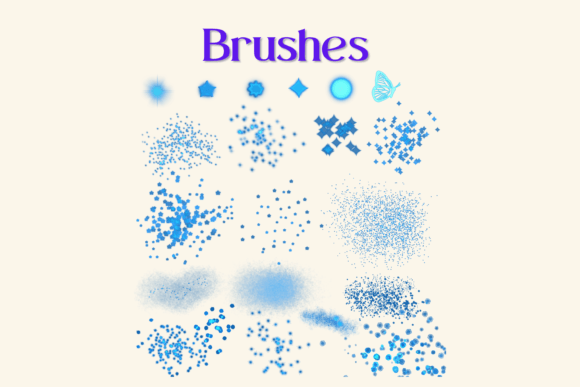
The Procreate Magic Brushes X 18 is a digital asset pack containing eighteen unique, pressure-sensitive brushes. These are not standalone applications but rather custom configurations that function exclusively within the Procreate app on Apple iPads. The core value proposition of this pack lies in its ability to simulate magical, ethereal effects—such as glimmers, sparkles, and soft gradients—that can be difficult to achieve with standard default brushes.
Each brush in the set is engineered to respond to the pressure and tilt of the Apple Pencil. This sensitivity allows for dynamic line variation, meaning that a light touch produces subtle, faint marks, while increased pressure results in bolder, more opaque strokes. This level of control is essential for creating organic, natural-looking illustrations rather than rigid, computer-generated graphics. The "hand-drawn" nature of these brushes ensures that every stroke retains a human touch, making them suitable for projects where authenticity and warmth are desired.
Compatibility and Technical Requirements
Before considering a purchase or download, it is critical to understand the technical ecosystem required to use these brushes. The Procreate Magic Brushes X 18 will only work within the Procreate application. Consequently, users must own an iPad compatible with Procreate and have the app installed. Furthermore, to fully utilize the pressure-sensitive features, an Apple Pencil is effectively mandatory. While finger painting is possible in Procreate, it does not offer the precision or pressure variance needed to leverage the specific capabilities of this brush pack.
The installation process also requires a specific workflow. As these are digital files, they are typically delivered as a compressed ZIP archive. Users need a method to download the file to their device, such as iCloud Drive, Dropbox, or direct browser download. Once downloaded, a file management tool capable of unzipping archives—such as iZip or the native Files app on iOS—is necessary to extract the contents. The final step involves importing the extracted .brushset file directly into Procreate, where it automatically creates a named folder containing the eighteen individual brushes. For those unfamiliar with file management on iOS, this process may present a slight learning curve, though numerous tutorials exist to guide users through the import procedure.
Practical Applications and Use Cases
The versatility of the Procreate Magic Brushes X 18 extends beyond simple sketching. These brushes are particularly well-suited for creating beautiful magical illustrations, making them a strong fit for fantasy art, children’s book illustrations, and whimsical character designs. The shimmering effects can add depth and intrigue to backgrounds, clothing textures, or magical artifacts within a composition.
Beyond pure illustration, these digital assets are valuable for DIY projects and commercial design work. Because the output is digital, the resulting artwork can be easily adapted for various printed goods. Common applications include:
- Greeting Cards and Invitations: The delicate, hand-drawn aesthetic adds a personal touch to wedding invitations, birthday cards, and holiday greetings.
- Scrapbooking and Journaling: Digital scrapbookers can use these brushes to create unique embellishments and borders without the mess of physical glue and paper.
- Wall Art and Decor: Artists can create high-resolution prints for home decor, leveraging the magical themes to produce calming or enchanting visual pieces.
- Print on Demand: Designers selling products via print-on-demand services can use these brushes to create unique patterns for wrapping paper, textiles, and stationery.
The ability to scale vector-like raster images without significant quality loss (provided the canvas resolution is set correctly) makes these brushes adaptable for both small-scale digital items and large-format prints.
Benefits and Tradeoffs
When evaluating the Procreate Magic Brushes X 18, it is important to weigh the benefits against potential limitations. The primary benefit is efficiency. Creating complex texture effects from scratch can be time-consuming. Having a pre-configured set of eighteen brushes allows artists to achieve professional-looking results quickly, streamlining the workflow for both hobbyists and professionals. Additionally, the pressure sensitivity ensures that the tools remain flexible, allowing for nuanced expression rather than static stamping.
However, there are tradeoffs. First, the dependency on the Apple ecosystem is absolute. Users with Android tablets or Windows devices cannot utilize these brushes. Second, while the brushes provide a strong foundation, they do not replace fundamental artistic skills. Understanding light, shadow, color theory, and composition remains essential to creating compelling artwork. The brushes are tools, not solutions. Finally, because these are raster-based brushes, their performance can depend on the iPad’s processing power and the resolution of the canvas. Extremely large canvases with multiple heavy brush layers may experience lag on older iPad models.
Decision-Making Insights: Is This Pack Right for You?
To determine if the Procreate Magic Brushes X 18 is a worthwhile addition to your toolkit, consider your current setup and artistic intentions. This pack is a strong fit if:
- You already own an iPad and Apple Pencil and are comfortable using the Procreate app.
- Your artistic style leans towards whimsical, magical, or soft aesthetics.
- You create digital goods for print-on-demand or personalized client work where unique textures add value.
- You want to speed up your workflow by avoiding the manual creation of complex sparkle or glow effects.
Conversely, you may want to consider alternatives if:
- You do not use an iPad or prefer other digital painting software like Adobe Fresco, Clip Studio Paint, or Photoshop.
- Your style is strictly geometric, hyper-realistic, or industrial, where magical shimmer effects may not be relevant.
- You are uncomfortable with the technical steps involved in downloading, unzipping, and importing third-party brush files.
It is also worth noting that while this pack offers eighteen unique brushes, serious professionals often accumulate larger libraries. If you are just starting, this curated set provides a focused selection that prevents choice paralysis. However, advanced users might view this as a supplementary pack rather than a comprehensive solution.
Conclusion
The Procreate Magic Brushes X 18 offers a specialized set of tools for digital artists looking to enhance their illustrations with magical, hand-drawn elements. Its strength lies in its ease of use within the Procreate ecosystem and its versatility across various creative projects, from digital art to printable goods. By understanding the technical requirements and aligning the brush characteristics with your artistic style, you can make an informed decision about whether this pack supports your creative journey. For iPad-based artists seeking to add a touch of shimmer and sophistication to their work, this collection represents a practical and effective resource.