Mastering Digital Grit: A Comprehensive Guide to Using 90 High-Resolution Concrete Texture Photoshop Brushes
In the evolving landscape of digital design, texture is not merely an aesthetic choice; it is a fundamental tool for establishing depth, realism, and emotional resonance. Among the most sought-after resources for graphic designers, photographers, and digital artists are concrete texture brushes. Specifically, the collection known as 90 Concrete Texture Photoshop Brushes offers a robust solution for creators looking to infuse their work with industrial grit and urban authenticity. This article explores the significance of these tools, their technical specifications, and how they can be seamlessly integrated into modern creative workflows across various versions of Adobe Photoshop.
Understanding the Power of Concrete Textures in Digital Art
Concrete is ubiquitous in modern architecture and urban environments. It represents strength, permanence, and often, a raw, unpolished beauty. When translated into digital art, concrete textures serve multiple purposes. They can act as backgrounds that ground a composition, overlays that add weathered character to clean vectors, or masks that create complex, organic transitions between elements.
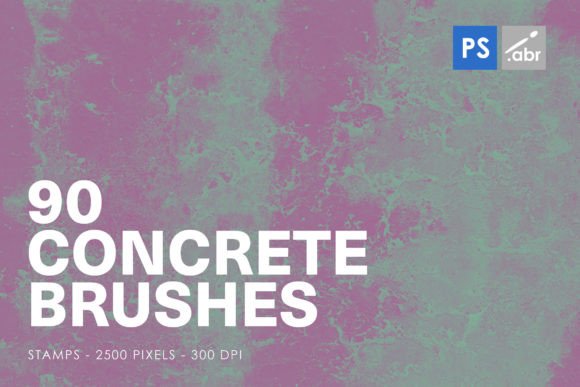
The 90 Concrete Texture Photoshop Stamp Brushes are designed to replicate this materiality with high fidelity. Unlike flat color fills, these brushes capture the nuanced imperfections of real-world surfaces—cracks, pits, stains, and grain variations. For beginners, understanding why texture matters is the first step toward professional-grade design. Texture breaks the "digital perfection" that often makes computer-generated images feel sterile. By introducing the chaotic, random nature of concrete, artists can create visuals that feel tactile and lived-in.
Why High Resolution Matters: The 2500-Pixel Advantage
One of the defining features of this specific brush set is its resolution. Each of the 90 stamp brushes is rendered at a size of 2500 pixels. In the context of digital imaging, this is a significant specification. Many free or low-quality brush sets offer low-resolution stamps that become pixelated or blurry when scaled up or printed at large formats.
High-resolution brushes ensure that every crack and speck of dust remains crisp, even when applied to large canvases such as billboards, posters, or high-definition web banners. This clarity is essential for photo manipulation and visual effects, where the boundary between the added texture and the original photograph must be invisible to the viewer. Whether you are working on a small social media graphic or a large-scale print project, the 2500-pixel dimension provides the flexibility needed to maintain quality without compromising performance.
Compatibility and Accessibility: From CS2 to Creative Cloud
A common concern for designers investing in new assets is software compatibility. The good news is that these Concrete Texture Photoshop Brushes are engineered for universal compatibility. They work seamlessly with Photoshop CS2 through to the latest versions of Adobe Creative Cloud (CC).
This broad compatibility is crucial for several reasons:
- Legacy Support: Many studios and freelancers still rely on older, stable versions of Photoshop like CS6 or CS2 for specific workflows. These brushes ensure that users of older software are not left behind.
- Future-Proofing: As Adobe updates its engine, .abr (Adobe Brush) files remain a standard format. This means your investment in this brush set is protected against future software iterations.
- Ease of Installation: Regardless of your version, installing these brushes is straightforward. Users simply need to load the .abr file into their brush preset manager, making the 90 unique textures immediately available for use.
Practical Applications: Beyond Simple Backgrounds
While many users initially purchase texture brushes for background creation, the versatility of this 90-brush set extends far beyond that. Here are several practical ways to integrate these tools into your daily creative activities:
- Digital Photo Manipulation: When compositing images, blending different elements can be challenging. Using a concrete stamp brush on a layer mask can help erode edges naturally, making a subject look like it belongs in a gritty urban environment. For example, adding a subtle concrete overlay to a portrait can create a moody, noir-inspired aesthetic.
- Typography and Text Fill: One of the most striking uses of concrete brushes is in typography. By using the brushes as a clipping mask or directly painting over text, designers can create letters that appear to be carved out of stone or painted on a rough wall. This technique is highly effective for movie posters, album covers, and bold headline designs.
- Game Asset Creation: For concept artists and game developers, these brushes are invaluable for creating quick environmental textures. They can be used to paint realistic walls, floors, and debris in 2D game art or as base maps for 3D modeling projects.
- Decorative Elements and UI Design: In web and app design, flat design is trending, but there is a growing movement toward "neo-brutalism" and textured interfaces. These concrete stamps can add subtle depth to buttons, cards, and dividers, enhancing the user experience through visual interest.
Common Misunderstandings About Texture Brushes
There is a misconception that using pre-made brushes is a "shortcut" that undermines artistic skill. On the contrary, knowing how to use these tools effectively requires a keen eye for composition and lighting. A brush is merely a tool; the artist decides where the light hits the concrete, how the shadow falls, and how the texture interacts with other elements. Mastering the opacity, flow, and blending modes associated with these 90 brushes is a skill that separates amateur designs from professional work.
Another assumption is that all concrete looks the same. However, this set includes 90 distinct variations. Some may feature fine grain suitable for smooth plaster, while others display heavy cracking ideal for abandoned buildings. Understanding the nuance between these variations allows for more accurate and compelling storytelling in visual art.
Integrating Concrete Textures into Modern Workflows
In today’s fast-paced digital economy, efficiency is key. Having a library of high-quality, ready-to-use assets like these concrete brushes can significantly reduce production time. Instead of spending hours photographing walls or scanning physical samples, designers can instantly access a diverse range of textures. This efficiency allows more time for creative decision-making and refinement.
Furthermore, these brushes support the trend of mixed-media digital art. As boundaries between photography, illustration, and 3D rendering blur, textures serve as the glue that binds disparate elements together. A 3D render might look too clean; a concrete overlay can ground it in reality. A vector illustration might feel too flat; a textured stamp can add necessary weight.
Tips for Getting the Most Out of Your Brush Set
To maximize the potential of the 90 Concrete Texture Photoshop Stamp Brushes, consider the following best practices:
- Experiment with Blending Modes: Try setting the brush layer to "Overlay," "Multiply," or "Soft Light" to see how the texture interacts with underlying colors. Each mode produces a different effect, from subtle grain to dramatic contrast.
- Adjust Opacity and Flow: Rarely will you want a brush stroke at 100% opacity. Lowering the opacity allows the texture to breathe and blend more naturally with the background.
- Combine Brushes: Don’t limit yourself to one stamp. Layering multiple concrete textures can create complex, multi-dimensional surfaces that mimic real-world wear and tear.
- Use Layer Masks: Instead of erasing parts of the texture, use layer masks. This non-destructive editing technique allows you to refine where the texture appears without permanently altering the image.
Conclusion
The 90 Concrete Texture Photoshop Brushes represent more than just a digital asset; they are a gateway to achieving greater realism and artistic depth in your projects. With their high-resolution 2500-pixel size, broad compatibility from CS2 to CC, and versatile application possibilities, they are an essential addition to any designer’s toolkit. Whether you are a beginner learning the basics of photo manipulation or an experienced artist refining your visual effects workflow, these brushes provide the raw material needed to bring your creative vision to life. By understanding the purpose and potential of concrete textures, you can elevate your digital artwork, creating pieces that are not only visually striking but also emotionally resonant and technically proficient.
For those looking to expand their digital library, investing in high-quality, specialized brush sets like this one is a step toward professional excellence. Embrace the grit, explore the textures, and let the imperfections of concrete inspire your next masterpiece.