Mastering Digital Expression: A Guide to Manga Eye Stamps and Procreate Brushes
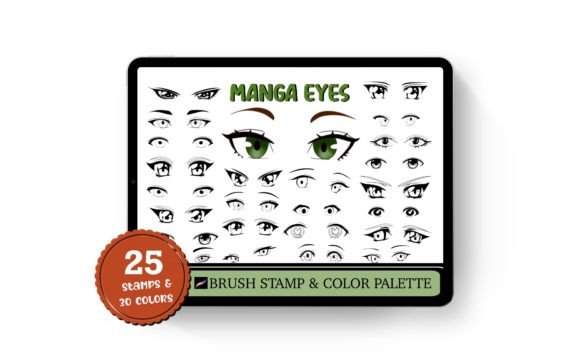
In the rapidly evolving world of digital art, efficiency and precision are just as important as raw talent. For artists specializing in anime, cartoons, and character design, the eyes are often considered the "windows to the soul" of a character. They convey emotion, personality, and style more effectively than any other feature. However, drawing intricate, consistent, and stylized eyes repeatedly can be time-consuming. This is where specialized tools like the Manga Eye 25 Stamps Procreate Brushes come into play, revolutionizing how creators approach character illustration.
This article explores the utility, significance, and practical application of these digital assets, helping both beginners and experienced illustrators understand how they can enhance their workflow within the Procreate ecosystem.
The Evolution of Digital Art Assets
Digital painting has moved far beyond simple mimicry of traditional media. Today, artists utilize a vast array of brushes, textures, and stamps to accelerate their creative process. A "stamp" in digital art terms is a pre-designed element that can be placed onto a canvas with a single tap. Unlike standard brushes that require continuous stroke movement, stamps allow for instant placement of complex shapes.
The Manga Eye 25 Stamp collection represents this shift toward smart workflows. By providing 25 different styles of hand-drawn manga eyes, this toolset allows artists to bypass the repetitive sketching phase. Instead of spending hours perfecting the curvature of an eyelid or the reflection in a pupil, an artist can select a style that matches their character’s mood and place it instantly. This does not replace artistic skill; rather, it frees up mental energy for higher-level creative decisions, such as composition, lighting, and storytelling.
Why Eyes Matter in Anime and Cartoon Art
In anime and cartoon aesthetics, eyes are disproportionately large and detailed compared to realistic human proportions. They are the primary focal point for viewers. A slight change in the shape of the iris or the angle of the eyelashes can transform a character from cheerful to melancholic. The Manga Eye stamps are designed with this nuance in mind. Each of the 25 styles offers a unique emotional baseline, providing a robust foundation for character development.
Furthermore, consistency is crucial in comic creation or character sheets. If an artist is drawing multiple panels or variations of the same character, maintaining identical eye structures manually is challenging. Using stamp brushes ensures that the fundamental structure remains consistent, allowing for easier coloring and shading later in the process.
Understanding the Toolset: Features and Capabilities
The Manga Eye 25 Stamps Procreate Brushes package is not just a collection of images; it is a fully integrated system designed for the Procreate app on iPad. Understanding its components is key to maximizing its potential.
- 25 Unique Stamp Styles: The core of the package includes 25 distinct eye designs. These range from wide, innocent looks to sharp, intense gazes, covering a broad spectrum of anime archetypes.
- 30 Eye Color Palette: Included in the download is a
.swatchesfile containing 30 pre-selected colors. These hues are curated to complement manga aesthetics, offering vibrant irises and subtle shading tones that save time on color theory experimentation. - Full Customizability: One of the most powerful features of Procreate stamps is their flexibility. Users can scale, resize, change opacity, and adjust color settings. This means no two eyes need to look exactly alike. An artist can take a base stamp, flip it horizontally for the other eye, adjust the hue to match a character’s hair, and lower the opacity for a softer, dreamier look.
It is important to note that these are Procreate Brush files specifically. They are optimized for the Apple Pencil and touch interface, ensuring a smooth user experience that native desktop software might not replicate in the same intuitive way.
Practical Applications Beyond Simple Drawing
While the primary use case is obviously Drawing Anime and Cartoon Portrait creation, the versatility of these stamps extends into other creative fields.
Tattoo Design and Flash Sheets
Tattoo artists often create "flash sheets"—pre-drawn designs available for clients to choose from. Anime-style tattoos are increasingly popular. Using these eye stamps, tattoo artists can quickly generate variations of eye designs to present to clients. The high-contrast, clean lines typical of manga art translate well into tattoo stencils. Artists can modify the stamps to fit specific body contours, ensuring the design flows with the muscle structure.
Educational Tools for Beginners
For students learning digital art, these stamps serve as excellent study aids. By placing a stamp on a layer and lowering its opacity, a beginner can trace over it to understand the construction of complex eye shapes. This method, known as "master studies," helps learners internalize the geometry of anime eyes—understanding where the highlight sits, how the upper lash line curves, and how the iris interacts with the eyelid.
Commercial Illustration and Merchandise
Creators who sell merchandise, such as stickers, pins, or prints, often need to produce high volumes of artwork. The efficiency gained by using Eye doodle stamps can significantly increase output without sacrificing quality. This is particularly relevant for small business owners who manage their own illustration pipelines.
How to Install and Use Manga Eye Stamps
One of the common barriers to adopting new digital tools is the installation process. Fortunately, the Manga Eye 25 Stamps are designed for Instant Download and easy integration. Here is a step-by-step guide to getting started:
- Download and Unzip: After purchasing, you will receive a ZIP file. Download this to your iPad or computer. If on a computer, unzip the file to reveal the
Manga_eye3folder. - Locate the Files: Inside the folder, you will find two key files:
Manga_Eye3.brushset: This contains the 25 stamp brushes.Manga_Eye3.swatches: This contains the 30-color palette.
- Import to Procreate: Tap and hold the
.brushsetfile with your finger or Apple Pencil. Select "Open in Procreate." The app will automatically import the brushes into your library. Repeat this process for the.swatchesfile to add the color palette. - Access Your New Tools: Open Procreate and navigate to your Brush Library. You will find a new set labeled "Manga Eye." Similarly, the color swatches will appear in your Palettes panel.
- Start Creating: Select a stamp, choose your desired color from the new palette, and simply tap on your canvas. Use the transform tool to resize or rotate the eye as needed.
Note: These brushes work with the app Procreate for iPad only. They will not function in Photoshop, Clip Studio Paint, or other software applications. This exclusivity ensures that the brushes are optimized for the specific engine and touch gestures of Procreate.
Common Misconceptions About Using Stamps
Some purists argue that using stamps constitutes "cheating" or diminishes artistic integrity. This is a misunderstanding of modern digital workflows. Professional concept artists and illustrators frequently use assets, 3D models, and photo bashes to speed up production. The value lies not in drawing every pixel from scratch, but in the final composition and emotional impact of the piece.
Using Hand Drawn Manga eye stamps allows artists to focus on what truly matters: the story. The stamps are merely elements for decorating your art work, providing a solid foundation upon which you build your unique style. You are still responsible for lighting, expression, context, and integration. The stamp is the starting line, not the finish line.
Conclusion
The Manga Eye 25 Stamps Procreate Brushes represent a valuable addition to any digital artist’s toolkit. By combining 25 different styles with a curated 30 color palette, this set offers both variety and cohesion. Whether you are creating Cartoon Portrait commissions, designing Tattoo flash, or simply practicing Eye doodle techniques, these tools streamline the creative process.
As digital art continues to integrate deeper into modern life, from social media content to professional entertainment production, understanding how to leverage such tools is essential. They bridge the gap between technical skill and creative vision, allowing artists to express themselves more freely and efficiently. For anyone looking to enhance their anime or cartoon illustrations, exploring these Procreate-compatible stamps is a logical and beneficial next step.