Mastering Digital Sparkle: A Guide to Procreate Diamond Brushes for iPad Artists
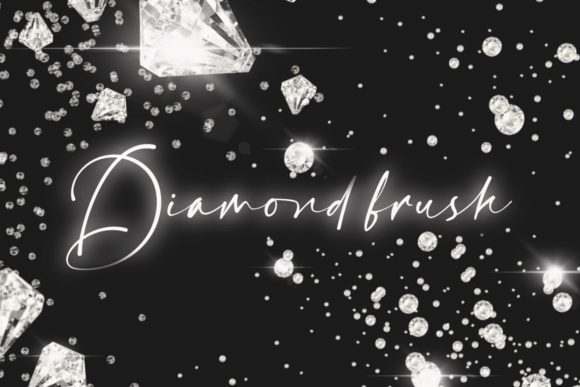
The evolution of digital illustration has transformed the way artists approach texture, light, and detail. Among the myriad of tools available to modern creators, specialized brush sets have become indispensable for achieving professional-grade results with efficiency. Specifically, Procreate Diamond Brushes have emerged as a vital resource for illustrators, designers, and hobbyists who seek to incorporate intricate sparkle effects, gem-like textures, and luminous highlights into their work without the tedious process of manual rendering. These tools are designed exclusively for the Procreate application on the iPad, leveraging the precision of the Apple Pencil to deliver a seamless creative experience.
Understanding the utility of these brushes requires a look beyond simple aesthetics. In digital art, consistency and speed are often just as valuable as artistic vision. The ability to apply complex diamond patterns or glitter effects instantly allows artists to focus on composition and color theory rather than getting bogged down in repetitive detailing. This article explores the practical applications, technical specifications, and workflow integration of these clean and easy-to-use stamps, providing a comprehensive overview for anyone looking to enhance their digital toolkit.
The Technical Advantage of Specialized Stamp Brushes
Traditional methods of creating sparkle effects in digital art often involve manually painting individual points of light, adjusting opacity layers, and blending modes to simulate refraction. While this method offers total control, it is time-consuming and can lead to inconsistent results. Procreate Diamond Brushes solve this problem by utilizing pre-designed stamp mechanics. Each brush stroke applies a perfectly formed diamond or glitter shape, ensuring uniformity and precision that is difficult to achieve freehand.
The core benefit of these brushes lies in their versatility regarding color and opacity. Unlike static images that might require extensive editing to fit a specific color palette, these brushes respond dynamically to the user’s selected color. An artist can switch from a cool, icy blue diamond to a warm, golden amber highlight with a single tap. Furthermore, the ability to adjust opacity allows for subtle integration into existing artwork. A lower opacity setting can create the illusion of distant twinkling stars or soft bokeh effects, while full opacity provides sharp, crisp highlights suitable for jewelry design or fantasy magic effects.
It is crucial to note that these tools are optimized specifically for the Procreate ecosystem. The .brushset format ensures that the brushes interact correctly with Procreate’s rendering engine, taking advantage of pressure sensitivity and tilt features if applicable. This compatibility guarantees that the user experience remains smooth, with no lag or formatting errors that might occur when trying to import incompatible file types.
Workflow Integration and Ease of Use
One of the most significant barriers to adopting new digital tools is the learning curve. However, Procreate Diamond Brushes are designed with accessibility in mind. The premise is "clean and easy to use," meaning that even beginners can achieve professional results immediately after installation. There is no need for complex configuration or custom settings adjustments. The brushes work out of the box, allowing creators to dive straight into their projects.
The installation process is straightforward, reflecting the user-friendly nature of the product. After purchasing, users receive an email with a download link. The file provided is a single .brushset file, which simplifies organization and transfer. To install, users simply download the file to their iPad and tap on it. The Procreate app automatically recognizes the format and imports the brushes into the library. This seamless integration minimizes friction, ensuring that the tool serves the artist rather than becoming a technical hurdle.
Once installed, the brushes appear in the Procreate brush library, ready for immediate use. Artists can organize them into custom folders alongside other texture or effect brushes, creating a personalized workspace that suits their specific style. The intuitive nature of the Apple Pencil further enhances this workflow. The natural hand-eye coordination provided by the iPad and Pencil combination allows for precise placement of each diamond stamp, making it feel as though the artist is physically placing gems onto the canvas.
Diverse Applications Across Creative Industries
The utility of Procreate Diamond Brushes extends far beyond simple decoration. Various professionals and hobbyists can leverage these tools to enhance their specific niches. For character designers, these brushes are invaluable for adding magical elements to costumes, weapons, or accessories. A fantasy illustrator might use them to depict enchanted armor or spell effects, adding a layer of depth and realism to the narrative of the piece.
In the realm of fashion illustration, the ability to quickly render jeweled embellishments is a game-changer. Designers can sketch garments and instantly visualize how diamond encrustations or sequin patterns would look on the fabric. This rapid prototyping capability allows for faster iteration and more effective communication with clients or production teams. Similarly, product designers creating digital mockups for jewelry can use these brushes to simulate light reflection and sparkle, providing a more appealing presentation of their designs.
Educators and content creators also find value in these tools. When creating tutorial materials or social media graphics, eye-catching elements are essential for engagement. Adding subtle sparkle effects to text or borders can draw attention to key information without overwhelming the viewer. The clean aesthetic of these diamonds ensures that they enhance rather than distract from the primary content.
Considerations for Optimal Results
While Procreate Diamond Brushes are powerful, achieving the best results requires an understanding of digital layering and composition. Because these are stamp brushes, overuse can lead to a cluttered or chaotic appearance. It is advisable to use them sparingly to highlight focal points rather than covering large areas indiscriminately. Strategic placement ensures that the sparkle effects guide the viewer’s eye through the artwork.
Layer management is another critical consideration. Artists should typically place these brushes on separate layers above the main illustration. This non-destructive approach allows for easy adjustments to position, opacity, and blending modes. Experimenting with different blending modes, such as "Add" or "Screen," can create more realistic light interactions, making the diamonds appear to glow against darker backgrounds.
Additionally, users must remember that these files are exclusively compatible with the Procreate app. They will not function in other digital art software such as Photoshop, Clip Studio Paint, or Procreate Pocket. Ensuring that you are using the correct hardware—an iPad with an Apple Pencil—and the correct software version is essential for a smooth experience. The instant download format means there are no physical shipping delays, but it also places the responsibility of file management on the user. Keeping backups of the .brushset file is recommended to prevent data loss.
Enhancing Professional Quality with Digital Efficiency
In today’s fast-paced creative economy, the ability to produce high-quality work efficiently is a competitive advantage. Procreate Diamond Brushes offer a blend of artistic flair and technical efficiency that meets this demand. By automating the creation of complex textures, these tools free up mental bandwidth for higher-level creative decisions. Whether you are a seasoned professional looking to streamline your workflow or a hobbyist eager to add a touch of magic to your drawings, these brushes provide a reliable and versatile solution.
The emphasis on clean, easy-to-use design reflects a broader trend in digital art tools: the democratization of professional techniques. Tools that were once reserved for experts with hours to spare are now accessible to everyone with an iPad. This shift empowers a wider range of creators to express their visions without being limited by technical constraints. As digital art continues to evolve, resources like these diamond brushes will play an increasingly important role in shaping the visual landscape of online content, commercial design, and personal expression.
Ultimately, the value of Procreate Diamond Brushes lies in their ability to bridge the gap between imagination and execution. They provide a tangible way to capture the ephemeral quality of light and sparkle, enhancing the emotional impact of digital artwork. By integrating these tools into your creative process, you open up new possibilities for storytelling, design, and visual communication, all while maintaining the flexibility and convenience that define the modern digital art experience.