Mastering Landscape Depth with Procreate Trees Stamp Brushes Silhouette
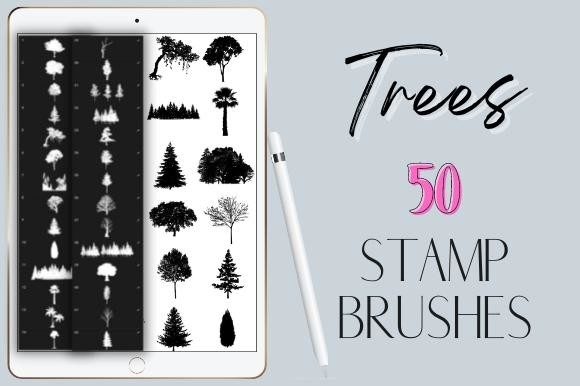
Digital landscape illustration often presents a unique paradox for artists: the desire to create expansive, detailed natural environments clashes with the time-consuming reality of rendering every leaf, branch, and trunk manually. For iPad users working within the Procreate ecosystem, Procreate Trees Stamp Brushes Silhouette offer a strategic solution to this bottleneck. These tools are not merely shortcuts; they are specialized assets designed to accelerate workflow while maintaining artistic integrity. By leveraging 50 unique hand-drawn tree stamps, illustrators can populate scenes with organic variety, transforming sparse sketches into dense forests with remarkable efficiency.
Understanding the utility of these brushes requires looking beyond their immediate visual appeal. They represent a shift in how digital nature art is constructed, moving from pixel-by-pixel construction to compositional layering. This article explores the functional advantages of silhouette-based stamp brushes, compares them to traditional drawing methods, and outlines the specific scenarios where they provide the most value to professional and hobbyist artists alike.
The Mechanics of Pressure-Sensitive Stamping
The core functionality of Procreate Trees Stamp Brushes Silhouette lies in their pressure sensitivity. Unlike static stickers or fixed images that must be resized and rotated manually for each instance, these brushes respond dynamically to the Apple Pencil’s input. A light touch might deposit a single, delicate sapling, while increased pressure can generate a cluster of trees or a dense thicket in a single stroke. This variability is crucial for creating natural-looking environments, as it mimics the random distribution found in real ecosystems.
Furthermore, the integration with Procreate’s color engine allows for seamless adaptation. Users do not need to edit the brush files themselves to change hues. Simply selecting a desired color from the palette applies that tone to the tree silhouette instantly. This feature is particularly valuable when establishing atmospheric perspective. An artist can quickly switch from deep, dark greens for foreground elements to muted, desaturated blues for distant treelines, ensuring depth and cohesion without interrupting the creative flow.
Evaluating Hand-Drawn Quality vs. Photorealism
When considering digital assets, a common concern is the "stock" look—where repeated elements appear identical and artificial. The 50 unique hand-drawn designs included in this set mitigate this risk by providing substantial variation. Each brush captures a distinct species or growth pattern, ranging from broadleaf deciduous forms to slender conifers. Because these are hand-drawn rather than traced from photographs, they possess an inherent stylistic consistency that blends well with illustrative workflows.
However, it is important to distinguish between silhouette brushes and detailed texture brushes. Silhouettes are inherently two-dimensional representations of three-dimensional objects. They excel at defining shape and mass but lack internal detail such as bark texture or individual leaf structures. This distinction defines their best use case: they are ideal for mid-ground and background elements where fine detail would be lost or distracting. For foreground focal points, artists may still need to combine these stamps with manual detailing or higher-resolution texture brushes to achieve the desired level of realism.
Comparative Analysis: Stamps vs. Manual Drawing
To determine if Procreate Trees Stamp Brushes Silhouette are the right tool for your project, it is helpful to compare them against the alternative: manual drawing. Both approaches have distinct tradeoffs regarding time, control, and artistic expression.
- Time Efficiency: Manual drawing offers ultimate control but is labor-intensive. Rendering a forest by hand can take hours. Stamp brushes reduce this to minutes, allowing artists to iterate on composition rapidly.
- Compositional Flexibility: With manual drawing, changing the layout of a forest often requires redrawing large sections. With stamp brushes, elements can be erased, resized, or recolored non-destructively, facilitating easier experimentation.
- Stylistic Uniformity: Hand-drawn trees may vary in style depending on the artist’s fatigue or mood. A curated brush set ensures consistent line weight and stylistic tone throughout the piece.
- Learning Curve: Mastering the art of drawing realistic trees takes years. Stamp brushes allow beginners to produce professional-looking backgrounds immediately, though they may limit the development of fundamental drawing skills if relied upon exclusively.
For concept artists and illustrators working under tight deadlines, the efficiency gain is undeniable. However, for fine art practitioners who prioritize the meditative process of creation, the immediacy of stamps might feel less satisfying. The decision ultimately rests on the project’s goals: is the priority speed and composition, or the tactile experience of drawing?
Technical Compatibility and Limitations
A critical factor in adopting any digital tool is compatibility. Procreate Trees Stamp Brushes Silhouette are engineered specifically for the Procreate app on iPad. They utilize Procreate’s proprietary brush engine, which means they will not function in Adobe Photoshop, Clip Studio Paint, or other desktop-based software. This limitation is significant for artists who maintain a hybrid workflow across multiple devices.
Additionally, these brushes require an Apple Pencil for optimal performance. While finger painting is possible in Procreate, the pressure sensitivity that drives the variable density of these tree stamps is best utilized with a stylus. Users without an Apple Pencil may find the brushes less responsive and harder to control, potentially resulting in uniform, unnatural patterns rather than organic clusters.
It is also worth noting that these are digital downloads delivered via a ZIP file. Users must be comfortable with basic file management on their iPad, such as importing .brushset files into the Procreate library. While straightforward, this step can be a barrier for those unfamiliar with digital asset installation.
Strategic Use Cases for Silhouette Brushes
Identifying the right context for using Procreate Trees Stamp Brushes Silhouette can significantly enhance their value. Here are several scenarios where these tools shine:
- Background Layering: Use lighter, cooler-colored stamps to create distant forest lines. This establishes depth without requiring intricate detail.
- Rapid Prototyping: Concept artists can quickly block out environmental layouts to test composition before committing to detailed rendering.
- Storybook Illustration: The hand-drawn aesthetic aligns well with children’s books and narrative art, where stylized rather than photorealistic nature is preferred.
- Atmospheric Effects: By lowering the opacity of stamp layers, artists can create misty, ethereal woods that blend seamlessly into the sky or fog.
Conversely, these brushes may be less suitable for hyper-realistic botanical illustrations or architectural renderings where precise species identification and structural accuracy are paramount. In such cases, reference-based manual drawing or 3D modeling might be more appropriate.
Making an Informed Decision
Integrating Procreate Trees Stamp Brushes Silhouette into your toolkit is less about replacing skill and more about expanding capability. They offer a pragmatic balance between artistic control and production efficiency. For artists aged 20–50 who are often balancing creative projects with professional or personal commitments, the ability to streamline repetitive tasks is invaluable.
Before purchasing or downloading, consider your current workflow. If you frequently struggle with empty backgrounds or spend disproportionate time drawing filler elements, these brushes offer a high return on investment. However, if your work relies heavily on unique, bespoke textures or if you operate outside the Apple ecosystem, alternative solutions may be necessary.
Ultimately, the value of these 50 unique hand-drawn tree stamps lies in their versatility. They are not a crutch but a catalyst, enabling artists to focus their energy on the creative aspects of storytelling and composition rather than the mechanical repetition of drawing similar shapes. By understanding their strengths and limitations, users can leverage Procreate Trees Stamp Brushes Silhouette to elevate their landscape artwork with confidence and precision.