Sign Painting Brushes for Procreate: Bring Mid-Century American Typography to Your iPad
There is a specific kind of magic in the hand-lettered signs that lined Main Streets across America in the 1950s. They weren’t just advertisements; they were pieces of public art, painted with confidence, flair, and a distinct lack of digital perfection. For modern creators, replicating that authentic, analog warmth on a sterile glass screen can feel impossible. This is where Sign Painting Brushes for Procreate changes the game. These tools are not merely filters or stamps; they are engineered simulations of traditional bristle behavior, designed to help you draw signs directly on your iPad with the same organic unpredictability found in mid-century commercial art.
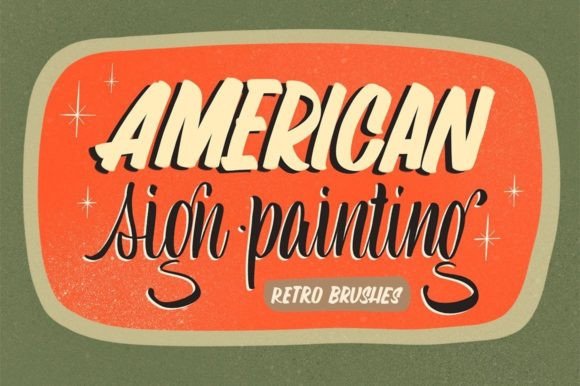
When you download a pack like "These 32 Brushes for sign painting will move you to the 50s of America," you are accessing a curated toolkit that understands the physics of paint. The brush engine in Procreate is powerful, but it requires the right settings to mimic the drag of a hog-hair brush against rough wood or the smooth glide of sable on glass. This collection bridges that gap, allowing your possibilities to remain limited only by your imagination, not by the limitations of standard digital tools.
Why Digital Sign Painting Matters Today
You might wonder why anyone would bother learning digital sign painting when vector software like Illustrator offers perfect scalability and precision. The answer lies in human connection. In an era saturated with polished, algorithmic design, imperfection stands out. Hand-lettered signs convey trust, craftsmanship, and personality. They suggest that a human being took the time to create something unique.
For freelancers and small business owners, this distinction is valuable. A coffee shop logo created with Sign Painting Brushes for Procreate feels warmer and more inviting than one generated from a generic font library. It taps into nostalgia, evoking the comfort of local diners and vintage storefronts. By using these brushes, you are not just drawing letters; you are invoking a feeling of heritage and quality that resonates deeply with consumers aged 20 to 50 who crave authenticity in their daily interactions.
Real-World Applications for Creators and Entrepreneurs
The utility of these brushes extends far beyond hobbyist sketching. Here is how different professionals can integrate this toolkit into their workflow:
Branding and Identity Design
Graphic designers often struggle to make digital logos feel "hand-made." Using standard tablets with basic round brushes rarely achieves the tapered strokes and dry-brush textures essential for vintage typography. With a dedicated sign painting set, you can create custom logotypes for breweries, barbershops, or artisanal bakeries that look like they were painted on the window decades ago. The ability to adjust opacity and flow dynamically allows for natural build-up of paint, creating depth that vectors simply cannot replicate without extensive manual editing.
Social Media Content Creation
Bloggers and influencers need eye-catching visuals that stop the scroll. A quote graphic designed with authentic brush strokes performs significantly better than plain text overlays. By using these 32 brushes, content creators can produce daily inspirational posts, event announcements, or product highlights that maintain a consistent, artistic aesthetic. The learning curve is manageable because the brushes do much of the heavy lifting regarding texture and edge variation, letting you focus on composition and message.
Educational and Tutorial Materials
Educators teaching typography or art history can use these tools to demonstrate the mechanics of letter formation. Instead of showing static images of 1950s signs, instructors can record time-lapse videos of themselves constructing letters in Procreate. This visual breakdown helps students understand pressure sensitivity, stroke order, and the rhythm of sign writing. It transforms abstract concepts into tangible, observable actions.
Understanding the Toolset: What Makes These Brushes Different
Not all Procreate brush packs are created equal. Many claim to be "vintage" but rely heavily on static textures that repeat visibly. High-quality Sign Painting Brushes for Procreate utilize complex grain sources and dynamic shape behaviors. When you press harder, the bristles splay. When you move quickly, the paint thins out. When you linger, the ink bleeds slightly into the digital paper texture.
This specific collection of 32 brushes likely includes variations for different stages of the sign painting process:
- Liner Brushes: For sharp, consistent outlines and fine details.
- Filler Brushes: Designed to cover large areas smoothly without visible banding.
- Shader Brushes: To add dimension and shadow, giving flat letters a 3D appearance.
- Dry Brush Effects: To simulate the worn, weathered look of aged signage.
Having this variety within a single pack means you do not need to switch between multiple apps or import external textures constantly. Everything you need to go from a rough sketch to a finished, textured piece is available at your fingertips.
Considerations Before You Start
While these tools are powerful, they are not magic wands. Achieving professional results requires an understanding of traditional sign painting principles. Before diving in, consider the following:
Hardware Matters: While an iPad is portable, the experience varies depending on your model and Apple Pencil generation. Ensure your device supports pressure sensitivity adequately. Additionally, consider using a matte screen protector. Glass is slippery, which can make controlling long, sweeping strokes difficult. A paper-like surface provides the friction necessary to mimic the resistance of a real wall or canvas.
Learning Curve: If you have never held a brush before, digital sign painting will still require practice. The brushes simulate reality, but they do not replace skill. Spend time practicing basic strokes—upstrokes, downstrokes, and ovals—before attempting full words. Watch tutorials on traditional sign writing to understand the logic behind letter construction. The digital tool will respond to your hand, so improving your physical control improves your digital output.
Layer Management: Digital art allows for unlimited undo steps, which is both a blessing and a curse. It can encourage sloppy habits. Treat your digital canvas like a real one. Plan your layout, sketch lightly, and commit to strokes. Use layers strategically: keep your sketch on one layer, your base colors on another, and your highlights and shadows on separate layers above. This non-destructive workflow allows you to tweak individual elements without ruining the entire piece.
Integrating Nostalgia into Modern Workflows
The appeal of the 1950s aesthetic is not just about looking backward; it is about bringing a sense of stability and craft into a fast-paced digital world. When you use Sign Painting Brushes for Procreate, you are participating in a revival of manual skills. Whether you are designing a wedding invitation, creating a mural concept for a client, or simply journaling with a artistic flair, these brushes provide the tactile satisfaction of traditional media with the convenience of digital editing.
Imagine designing a menu for a local restaurant. Instead of typing out the specials in Helvetica, you paint them with a bold, shadowed script that evokes the golden age of American diners. The result is not just readable; it is atmospheric. It sets the tone for the dining experience before the customer even orders. This is the power of context-aware design, facilitated by the right digital tools.
Ultimately, the value of this brush set lies in its ability to democratize a specialized skill. Sign painting was once a trade learned through apprenticeships. Now, with an iPad and the right software, anyone with the desire to learn can access these techniques. The barriers to entry are lower, but the ceiling for creativity remains incredibly high. As you experiment with these 32 brushes, you will find that they do not just replicate the past; they enable you to create something entirely new, rooted in tradition but executed with modern efficiency.
So, open Procreate, select your brush, and start painting. The spirit of mid-century Americana is waiting for your interpretation, and your next masterpiece is only a few strokes away.