Botanical Procreate Brushes: Integrating Hand-Drawn Stamps into Your Digital Workflow
In the evolving landscape of digital illustration, efficiency often dictates the success of a creative project. For professionals and hobbyists alike, the ability to maintain high visual fidelity while managing tight deadlines is a constant balancing act. This is where specialized assets like Botanical Procreate Brushes become essential components of a modern designer’s toolkit. Rather than viewing these tools merely as decorative additions, it is more productive to understand them as workflow accelerators that bridge the gap between hand-drawn authenticity and digital scalability.
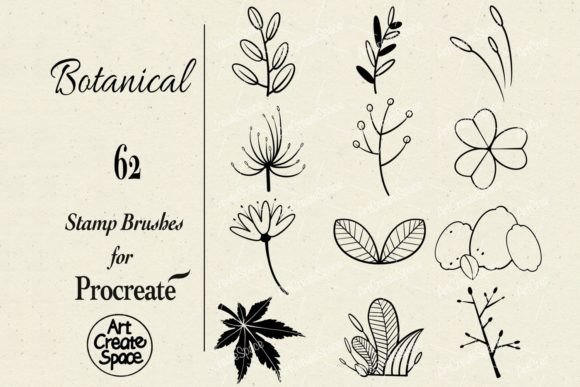
This collection includes 62 distinct “Botanical” stamp brushes, delivered in the native .brushset format within a compressed Zip file. These assets are designed specifically for the Procreate app on iPad, leveraging the precision of the Apple Pencil to deliver organic, textured results. Understanding how to integrate these stamps into your broader creative process—from initial concepting to final client delivery—can significantly enhance both the quality and speed of your output.
Understanding the Role of Stamp Brushes in Digital Design
Stamp brushes differ fundamentally from standard drawing brushes. While a standard brush relies on continuous stroke input to create form, a stamp brush places a pre-designed graphic element onto the canvas with a single tap or drag. In the context of botanical illustration, this means you are not drawing every leaf vein or petal curve from scratch. Instead, you are curating and composing existing high-quality elements.
This distinction is crucial for workflow planning. When you incorporate Hand-drawn Botanical stamp brushes for Procreate into your routine, you shift your role from pure executor to composer. This allows for rapid iteration. You can test multiple layout configurations for a wedding invitation, a product label, or a social media graphic in minutes rather than hours. The value lies not just in the aesthetic of the leaves and flowers, but in the time saved during the composition phase.
Preparation and Compatibility: Setting the Foundation
Before integrating these assets into your daily work, it is vital to address technical compatibility. As noted in the product specifications, these are digital brushes exclusively for the Procreate App on iPad. They will not function in Photoshop, Illustrator, or desktop-based software. This limitation requires a deliberate decision in your toolchain selection. If your workflow involves moving between desktop and tablet, you must plan for this transition point.
Installation is straightforward but requires attention to detail. After downloading the Zip file, you must extract the .brushset file. Importing this directly into Procreate ensures that all 62 brushes are organized within a single folder in your brush library. Proper organization at this stage prevents clutter later. Consider renaming the brush set to something easily searchable, such as “Botanical Stamps – Master,” to ensure quick access during high-pressure projects.
Furthermore, ensure your iPad and Apple Pencil are calibrated for optimal performance. Since these stamps rely on pressure sensitivity for size variation and opacity control, a well-maintained stylus tip and updated software version are non-negotiable for consistent results.
Integrating Botanical Elements into Professional Workflows
The true power of Botanical Procreate Brushes emerges when they are applied to specific use cases. Below are practical scenarios where these tools enhance efficiency and quality.
Branding and Packaging Design
For entrepreneurs and small business owners, creating cohesive brand assets is a frequent challenge. Botanical elements convey freshness, organic quality, and elegance. Using these stamp brushes, you can rapidly prototype packaging designs for cosmetics, food products, or artisanal goods. Instead of commissioning custom illustrations for every variant, you can compose unique arrangements using the 62 available stamps. This allows for A/B testing of designs with minimal cost. Once a composition is finalized, it can be exported as a high-resolution PNG or PSD layer for further refinement in other software if necessary, though the primary creation happens in Procreate.
Editorial and Social Media Content
Marketers and bloggers require a steady stream of visually engaging content. Hand-drawn elements add a human touch that stock photography often lacks. By using these brushes, you can create custom headers, dividers, and accent pieces for blog posts or Instagram stories. The workflow here is iterative: select a base stamp, adjust the hue to match your brand palette, and duplicate it to create borders or frames. This process ensures visual consistency across platforms while reducing the time spent on repetitive design tasks.
Educational Materials and Planning
Educators and productivity-minded users can leverage these tools for creating engaging worksheets, planners, or journal templates. The organic nature of botanical illustrations softens the rigid structure of grids and text, making materials more approachable. For instance, a teacher might use leaf stamps to create thematic borders for science lessons, while a freelancer might use floral accents to beautify client invoices or project timelines. The key is consistency; by sticking to a defined set of brushes, your documents maintain a professional, unified look.
Techniques for Natural Composition
While stamp brushes offer speed, they can appear repetitive if used without technique. To maintain the illusion of hand-drawn authenticity, consider the following implementation tips:
- Vary Opacity and Size: Never use stamps at 100% opacity for every element. Lowering opacity creates depth and allows underlying layers to show through, mimicking the translucency of real leaves.
- Rotate and Flip: Use Procreate’s transform tools to rotate and flip stamps. This prevents recognizable patterns and ensures that no two elements look identical.
- Layering: Build complexity by layering multiple stamps. Start with larger background elements and add smaller details on top. This creates a sense of volume and realism.
- Color Harmonization: Avoid using pure black or default colors. Sample colors from your reference images or brand guidelines to ensure the botanical elements integrate seamlessly with the rest of your design.
These techniques require practice but quickly become second nature. The goal is to obscure the digital origin of the stamps, resulting in artwork that feels organic and intentional.
Quality Control and Long-Term Use
Maintaining a high standard of output requires regular quality checks. When using Hand-drawn Botanical stamp brushes for Procreate, periodically zoom out to view your composition as a whole. Ensure that the density of elements does not overwhelm the primary message or subject. White space is as important as the illustration itself.
Long-term usability also depends on asset management. As you create custom palettes or modified versions of these brushes, save them separately to avoid overwriting the original set. This preserves the integrity of the original 62 stamps while allowing for creative experimentation. Additionally, keep backups of your .brushset files in cloud storage. Digital assets are valuable intellectual property, and losing them due to hardware failure can disrupt ongoing projects.
Conclusion: Enhancing Creativity Through Efficiency
The integration of Botanical Procreate Brushes into your digital workflow is not about replacing skill with shortcuts. It is about optimizing your process to focus on higher-level creative decisions. By handling the intricate details of botanical textures through pre-made stamps, you free up mental energy for composition, color theory, and narrative structure.
Whether you are a professional designer managing client expectations, a marketer seeking standout visuals, or a hobbyist exploring digital art, these tools offer a practical solution to common creative bottlenecks. Remember that the value of these 62 stamps lies in their versatility and ease of use within the Procreate ecosystem. By mastering their application and respecting their technical constraints, you can elevate the quality of your work while maintaining a sustainable, efficient production pace.
Ultimately, the best tools are those that disappear into the workflow, allowing your creativity to take center stage. These botanical stamps are designed to do exactly that, providing a reliable foundation for beautiful, organic design in a digital world.