Enhance Your Digital Art with Pieces of Torn Paper Brushes (.ABR)
In the world of digital design, texture is often the missing ingredient that separates a flat, sterile image from something that feels tactile and alive. We spend hours perfecting layouts, choosing color palettes, and refining typography, yet our compositions can still feel too "clean." This is where Pieces of Torn Paper. Brushes .ABR come into play. These aren't just generic stamps; they are specialized tools designed to bring the organic, imperfect beauty of ripped paper into your digital workspace. Whether you are working in Photoshop on a desktop or sketching on an iPad with Procreate, these brushes offer a quick, intuitive way to add depth and character to your projects.
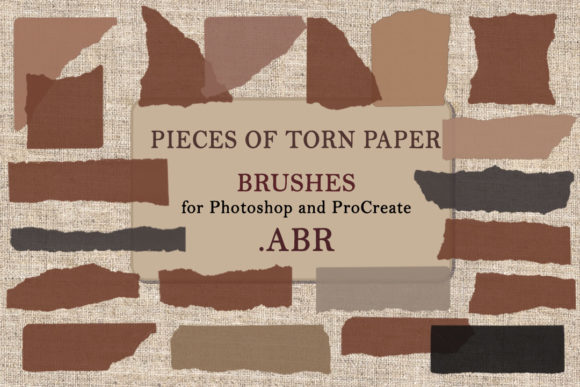
The package itself is straightforward and user-friendly. It arrives as a single ZIP folder containing one consolidated file of 20 distinct brush pieces. This simplicity matters. For busy creators, time is a resource as valuable as creativity. Having all twenty variations in a single .ABR file means you can install them with one click and start creating immediately. There is no need to hunt through multiple folders or manage disjointed assets. You simply load the file, and your library is instantly expanded with high-quality, ready-to-use torn paper elements.
Why Texture Matters in Modern Digital Design
We live in an era of high-definition screens and sleek, minimalist interfaces. While there is beauty in cleanliness, there is also a growing desire for authenticity. Audiences today connect with content that feels handcrafted and human. Using Pieces of Torn Paper. Brushes .ABR allows you to break the monotony of perfect digital lines. The jagged edges, subtle fibers, and natural irregularities of torn paper evoke nostalgia and warmth. They remind viewers of physical scrapbooks, old letters, and handmade collages.
This psychological connection is powerful. When a viewer sees a torn paper edge framing a photograph or separating sections of text, their brain registers it as something tangible. It slows down the scrolling experience. It invites the eye to linger. For marketers and bloggers, this increased engagement can translate into better retention rates. For artists, it adds a layer of sophistication that pure vector graphics often lack. The key is knowing when and how to apply these textures so they enhance rather than overwhelm your message.
Real-World Applications for Creators and Professionals
The versatility of these brushes means they fit seamlessly into a wide variety of workflows. Here is how different users can leverage this tool in their daily tasks:
Digital Scrapbooking and Memory Keeping
For hobbyists and professional scrapbookers who have moved their craft online, these brushes are indispensable. Traditional digital scrapbooking kits often rely on pre-made PNG elements, which can be rigid and hard to customize. With Pieces of Torn Paper. Brushes .ABR, you have the freedom to paint your own tears. You can control the length, direction, and placement of each rip. Imagine creating a layout for a family vacation album. Instead of using a standard rectangular frame for a photo, you can use the brush to create a ragged, organic border that looks like it was ripped from a notebook. This adds a personal, diary-like feel to your digital pages.
Social Media Content and Blogging
Content creators are constantly under pressure to produce fresh, eye-catching visuals for Instagram, Pinterest, and blogs. Standout graphics often require unique textures. You can use these torn paper brushes to create dynamic backgrounds for quote cards. By layering a few torn pieces in contrasting colors, you create a collage effect that draws attention to the text. Similarly, bloggers can use these elements to break up long articles. A horizontal tear across the screen serves as a more interesting section divider than a simple line. It guides the reader’s eye and provides a visual rest stop, improving the overall readability of your content.
Commercial Design and Branding
Small business owners and freelance designers can use these brushes to add an artisanal touch to branding materials. If you are designing packaging labels, business cards, or promotional flyers for a brand that values sustainability or handmade qualities, torn paper textures are highly effective. They communicate eco-friendliness and craftsmanship. For example, a local coffee shop might use a torn paper motif on their loyalty cards to suggest a rustic, welcoming atmosphere. The .ABR format allows you to scale these elements without losing quality, ensuring they look crisp whether printed on a small tag or a large poster.
Educational Materials and Presentations
Educators and corporate trainers often struggle to make slides and worksheets engaging. Standard bullet points and clip art can feel dry. Incorporating torn paper elements can make educational materials feel more approachable and less formal. You can use the brushes to create "note" effects, making key information look like it was jotted down on a scrap of paper. This technique works well for highlighting important takeaways in a presentation or creating visually appealing study guides. It helps students focus on critical information by framing it in a distinctive, memorable way.
Technical Considerations and Best Practices
Before you dive in, it is helpful to understand how to get the most out of Pieces of Torn Paper. Brushes .ABR. Since these are brush files, their behavior depends on your software settings. In Photoshop, you can adjust the size, opacity, and flow to achieve different effects. A lower opacity can create a subtle, layered look, while full opacity gives you bold, defined tears. In Procreate, the pressure sensitivity of your Apple Pencil allows for even more nuanced control. You can vary the thickness of the tear by adjusting how hard you press, mimicking the natural variation of tearing paper by hand.
It is also important to consider the resolution of your project. The preview images provided in the store give you a clear idea of the size and detail of each brush piece. Always check these previews to ensure the level of detail matches your needs. For high-resolution print work, you may need to use the brushes at a larger scale to maintain crisp edges. For web-based projects, the default sizes are usually perfect. Remember that these brushes are tools, not final products. Their effectiveness comes from how you combine them with other elements like photos, drawings, and typography.
Another consideration is color. While the brushes may come in a default black or white, their true power lies in recoloring. Use adjustment layers or blending modes to tint the paper pieces to match your brand colors or the mood of your artwork. A torn piece of paper in a soft pastel blue can convey calmness, while the same shape in a deep red can suggest urgency or passion. Experimentation is key. Don’t be afraid to stack multiple layers, rotate them, and blend them to create complex, multi-dimensional textures.
Getting Started and Support
Installing these brushes is a hassle-free process. Once you download the ZIP folder, extract the .ABR file. In Photoshop, go to the Brushes panel, click the menu icon, and select "Import Brushes." In Procreate, swipe left on any brush set and choose "Import." That’s it. You are ready to create. The simplicity of the installation ensures that you spend less time troubleshooting and more time designing.
If you encounter any issues during installation or have questions about how to best utilize these tools, support is readily available. Svetlana, the creator behind this resource, encourages users to reach out. Whether you are a seasoned designer looking for specific technical advice or a beginner unsure about where to start, feeling confident in your purchase is important. Good customer service reflects the quality of the product, and knowing that help is available can make the learning curve much smoother.
In conclusion, Pieces of Torn Paper. Brushes .ABR offer a practical, versatile solution for anyone looking to add texture and humanity to their digital work. From scrapbooking to commercial branding, the applications are limited only by your imagination. By integrating these organic elements into your workflow, you can create designs that resonate on a deeper, more tactile level. Download the file, explore the twenty unique pieces, and start transforming your digital canvas today.