Enhancing Digital Scrapbooking with Procreate Washi Tape Brushes and Paper Stamps
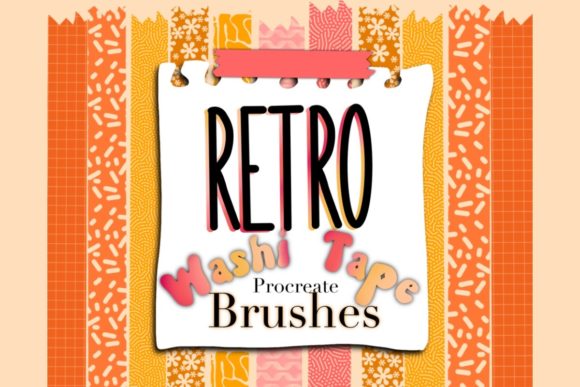
Digital art has evolved significantly, moving beyond simple sketching and painting into the realm of complex collage work and digital scrapbooking. For artists who appreciate the tactile aesthetic of physical journals but prefer the flexibility of digital tools, specialized resources are essential. One such resource gaining traction among iPad users is the Procreate Washi Tape Brushes Paper Stamp collection. This specific set offers a curated selection of twenty-three washi tape brushes and three floral stamps, designed to replicate the charming, imperfect edges and textured looks of traditional stationery supplies.
Understanding whether this digital asset fits your workflow requires looking beyond the surface appeal. It involves evaluating compatibility, ease of installation, licensing restrictions, and how these specific brushes compare to creating similar effects manually or using alternative digital libraries. This guide explores the practical aspects of integrating these stamps into your creative process, helping you determine if they align with your artistic goals.
Understanding the Asset: What You Receive
When you purchase this product, you are acquiring a specialized brush set tailored exclusively for the Procreate application. The core of the package includes twenty-three distinct washi tape brushes. These are not merely static images; they are engineered to function as stamps or drag-and-drop elements within the app. Additionally, the bundle includes three flower stamps, providing complementary decorative elements that pair well with the tape aesthetics.
The delivery method is straightforward but requires a specific technical step. Upon purchase, you receive a compressed ZIP file. To use the assets, you must unzip this file on your device or computer and then transfer the individual brush files to your tablet. Once you tap on the unzipped file on your iPad, Procreate should automatically recognize and import the brushes into your library. This automatic transfer feature simplifies the setup process, removing the need for complex manual installation steps often associated with third-party brush packs.
It is crucial to note a significant limitation regarding usage rights. The license for this product strictly prohibits resale. You cannot sell the brushes themselves, nor can you redistribute them as part of another brush pack. This is a standard restriction for most digital art assets, ensuring that the creator’s intellectual property remains protected while allowing you unlimited personal use in your artwork.
Compatibility and Technical Considerations
The most critical factor to consider before purchasing is software compatibility. These brushes are only compatible with the Procreate app. They will not work in Procreate Pocket, Adobe Fresco, Photoshop, Clip Studio Paint, or any other digital art software. If you are an artist who switches between multiple platforms, this exclusivity may be a drawback. However, for dedicated Procreate users, this specialization ensures that the brushes are optimized for the app’s unique brush engine, providing a smoother experience than generic image files might offer.
The installation process, while generally seamless, relies on the user’s ability to manage files on their tablet. Users unfamiliar with unzipping files or managing the "Files" app on iOS may encounter a slight learning curve. However, once the initial setup is complete, the brushes remain permanently in your library, ready for use in any project. If you encounter issues during installation, the creator, Resi, offers support via text, providing a direct line of communication for troubleshooting.
Comparing Digital Stamps to Manual Creation
Why use pre-made washi tape brushes instead of creating your own? This is a common question among intermediate and advanced digital artists. Creating realistic washi tape effects manually involves several steps: selecting a texture, applying masking tapes, adjusting opacity, adding drop shadows, and distorting the edges to mimic the torn paper look. While this approach offers total control, it is time-consuming.
The Procreate Washi Tape Brushes Paper Stamp set offers efficiency. With a single tap or swipe, you can place a realistically textured piece of tape onto your canvas. The twenty-three variations provide enough diversity to avoid repetitive patterns in your layouts. For professionals working on tight deadlines, such as social media content creators or digital planners, this speed is invaluable. However, the tradeoff is customization. Pre-made stamps have fixed colors and textures. If you need a specific shade of blue or a unique grunge pattern not included in the set, you may still need to create custom elements or adjust the hue and saturation of the existing stamps.
Evaluating the Aesthetic and Use Cases
The aesthetic of this brush set leans towards the organic and handcrafted. Washi tape is characterized by its semi-transparency and fibrous texture. High-quality digital replicas must capture these nuances to look convincing against other digital elements. The inclusion of three flower stamps adds versatility, allowing users to create cohesive botanical themes without sourcing additional assets.
This set is particularly well-suited for:
- Digital Planning: Enhancing daily planners with decorative borders and highlights.
- Scrapbooking: Adding realistic adhesive elements to photo collages.
- Social Media Graphics: Creating engaging, textured backgrounds for quotes or announcements.
- Journaling Apps: Adding visual interest to digital bullet journals.
Conversely, this set may be less suitable for artists seeking hyper-realistic 3D renders or those working in minimalist, flat-design styles where textured elements might feel out of place. It is also important to consider the scale. Washt tape brushes are typically designed for medium-sized applications. Using them for large-scale background fills may result in pixelation or visible repetition, depending on the resolution of your canvas.
Licensing and Ethical Usage
As mentioned earlier, the prohibition on selling the brushes is a key component of the purchase agreement. This distinction is vital for artists who intend to monetize their work. You are free to use the brushes in commercial projects, such as designing a printable planner or creating a digital sticker sheet for sale, provided the final product is a new creation and not merely a repackaging of the original brushes. For example, selling a digital journal page that incorporates the washi tape is generally acceptable, but selling the brush file itself is not.
Always review the specific license terms provided by the creator, Resi, to ensure compliance. Misunderstanding licensing agreements can lead to copyright issues, so clarity on what constitutes "derivative work" versus "redistribution" is essential for professional integrity.
Making the Decision: Is This Set Right for You?
Choosing the right digital assets depends on your specific needs and workflow. The Procreate Washi Tape Brushes Paper Stamp set is an excellent choice if you value convenience and aesthetic consistency. It eliminates the tedious process of creating realistic tape effects from scratch, allowing you to focus on composition and design. The automatic installation feature further reduces friction, making it accessible even to those with limited technical expertise.
However, if you require extensive customization, cross-platform compatibility, or a vast library of hundreds of variations, you might find this set limiting. In such cases, investing time in learning how to create custom brushes or purchasing a larger, more diverse library might be a better long-term strategy. Additionally, if you do not use Procreate, this product is not a viable option regardless of its quality.
Ultimately, this brush set serves as a specialized tool rather than a comprehensive solution. It excels in its niche, offering high-quality, ready-to-use elements that enhance the visual appeal of digital layouts. By understanding its strengths, limitations, and proper usage guidelines, you can make an informed decision about whether it deserves a place in your digital toolkit. For any remaining questions, reaching out directly to the creator ensures you have the support needed to maximize the value of your purchase.