Procreate Flower Stamps Brushes: Enhancing Digital Art and Planning
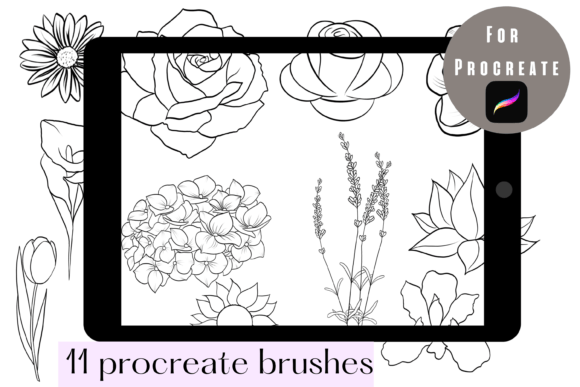
In the rapidly evolving landscape of digital creativity, efficiency often dictates the quality and consistency of output. For artists, designers, and digital planners using the iPad, the search for tools that streamline workflow without sacrificing aesthetic appeal is constant. Procreate Flower Stamps Brushes have emerged as a vital resource in this ecosystem. This set of 11 specialized brushes is designed exclusively for the Procreate app, offering a unique blend of convenience and artistic flexibility. By integrating these stamps into your digital toolkit, you can significantly reduce the time spent on repetitive decorative elements while maintaining full control over color, detail, and composition.
Understanding the Utility of Digital Stamp Brushes
Digital stamping is not merely about copying and pasting images; it is about creating a cohesive visual language that can be applied rapidly across various projects. The Procreate Flower Stamps Brushes serve as pre-designed assets that function as dynamic brush tips. Unlike static PNG files that require manual resizing and layer management for each instance, these brushes allow users to "paint" flowers onto the canvas with the natural fluidity of a traditional brush stroke. This distinction is crucial for professionals who need to maintain a high volume of output, such as social media managers, greeting card designers, or digital journal enthusiasts.
The primary value proposition of this specific set lies in its exclusivity to the Procreate environment. Because these brushes are engineered to work only within the Procreate app, they leverage the software’s native engine for pressure sensitivity, tilt support, and blending modes. This ensures that every stamp interacts with the digital paper in a way that feels organic rather than mechanical. Users can adjust the opacity, flow, and size dynamically, allowing for a level of customization that static clip art simply cannot match.
Key Features and Customization Capabilities
The versatility of the Procreate Flower Stamps Brushes extends beyond their initial design. Each of the 11 flowers in the set is crafted to be a starting point, not a final product. One of the most significant advantages is the ability to manipulate colors instantly. In traditional media, changing the hue of a stamped image might require physical alteration or complex masking techniques. In Procreate, users can utilize the Hue, Saturation, and Brightness adjustments or apply clipping masks to change the color palette of a flower to match any brand identity or seasonal theme within seconds.
Furthermore, the non-destructive nature of digital layers allows for precise editing. If a petal overlaps incorrectly or a detail feels too heavy, users can employ the eraser tool or layer masks to refine the shape. This level of control empowers creators to add or erase details as they wish, ensuring that each application of the brush feels unique. The brushes are not rigid templates; they are flexible components that adapt to the user’s creative vision. Whether you need a subtle background element or a bold focal point, these stamps can be scaled and modified to fit the context perfectly.
Practical Applications for Creators and Professionals
The utility of Procreate Flower Stamps Brushes spans a wide array of industries and hobbies. Understanding where these tools fit best can help users maximize their investment and improve their workflow efficiency.
- Digital Planning and Journaling: For individuals who maintain digital planners on their iPads, these brushes are invaluable. They allow for quick decoration of daily logs, mood trackers, and habit charts. Instead of spending hours drawing intricate florals, users can stamp them in seconds, freeing up time for actual planning and reflection.
- Social Media Content Creation: Influencers and small business owners often need to create visually appealing graphics for Instagram stories, Pinterest pins, or Facebook posts. These flower stamps provide a consistent aesthetic that can brand content effectively. They can be used to frame text, highlight products, or add a touch of elegance to promotional materials.
- Greeting Card and Invitation Design: Freelance designers can use these brushes to prototype and finalize designs for weddings, birthdays, and holidays. The ability to rapidly iterate on layouts by swapping out different flower stamps from the set of 11 allows for faster client approvals and reduced revision times.
- Educational Materials: Teachers and educational content creators can use these floral elements to soften the look of worksheets, certificates, and presentation slides, making learning materials more engaging and visually appealing to students.
Who Benefits Most from This Toolset?
While anyone with an interest in digital art can benefit from Procreate Flower Stamps Brushes, certain groups will find them particularly transformative. Beginners who may lack the confidence or skill to draw complex botanicals from scratch can achieve professional-looking results immediately. This boosts morale and encourages further exploration of digital art techniques. Professionals, on the other hand, benefit from the time-saving aspect. In a commercial setting, time is money. Reducing the time spent on decorative elements allows professionals to focus on higher-value tasks such as concept development, typography, and client communication.
Additionally, business owners who handle their own marketing can maintain a high standard of visual quality without needing to hire a graphic designer for every minor update. The ease of use means that even those with limited technical expertise can produce polished, cohesive visuals that enhance their brand presence.
Evaluating Suitability and Limitations
Before integrating any new tool into your workflow, it is essential to assess its suitability for your specific needs. The Procreate Flower Stamps Brushes are designed with a specific purpose: to aid in digital planning and decoration within the Procreate ecosystem. Therefore, their primary limitation is compatibility. As stated clearly, these brushes ONLY WORK IN PROCREATE APP. Users who rely on Adobe Fresco, Affinity Designer, or Photoshop on the iPad will not be able to utilize this specific set. This restriction is due to the proprietary brush engine format used by Procreate, which offers superior performance within that app but lacks cross-platform compatibility.
Another consideration is the style of the flowers. With 11 distinct designs, the set offers variety, but it may not cover every botanical species or artistic style. Users seeking hyper-realistic roses or abstract geometric florals might need to supplement this set with other resources. However, for general decorative purposes, the included designs are versatile enough to suit most casual and semi-professional projects.
It is also important to manage expectations regarding originality. Since these are pre-made stamps, there is a possibility that other users may have access to similar assets. To maintain uniqueness, creators should leverage the customization features—changing colors, combining multiple stamps, and adding hand-drawn details—to create composite images that are distinct to their personal style.
Best Practices for Integration
- Organize Your Library: Import the brushes into a dedicated folder within Procreate to keep your workspace tidy. This ensures quick access during intense creative sessions.
- Experiment with Blending Modes: Try setting the flower layers to "Multiply" or "Overlay" to see how they interact with textured backgrounds. This can create depth and integration that makes the stamps look like they were painted directly onto the surface.
- Combine with Hand-Lettering: Use the flowers to frame handwritten quotes or titles. The organic shapes of the flowers complement the fluidity of calligraphy, creating a harmonious composition.
- Create Custom Palettes: Save color combinations that work well with these flowers in your Procreate palette. This speeds up the process of recoloring stamps to match specific project themes.
Conclusion: Elevating Your Digital Workflow
The Procreate Flower Stamps Brushes represent more than just a collection of digital images; they are a workflow enhancement tool designed for the modern creator. By offering a balance of speed, flexibility, and aesthetic quality, this set of 11 brushes addresses the common pain points of digital decoration. Whether you are a seasoned designer looking to streamline your process or a hobbyist eager to beautify your digital journals, these brushes provide a practical solution.
The key to maximizing their value lies in understanding their strengths and limitations. Recognizing that they are exclusive to Procreate allows users to commit fully to that platform’s capabilities. Embracing the customizability of the stamps ensures that each project remains unique and tailored to specific needs. As digital creation continues to grow in importance across various sectors, tools that offer both efficiency and creative freedom will remain indispensable. By incorporating Procreate Flower Stamps Brushes into your arsenal, you equip yourself with the ability to create beautiful, professional-grade visuals with greater ease and confidence.
For those ready to enhance their digital planning and artistic projects, exploring this toolset is a logical next step. It invites users to move beyond the constraints of manual drawing for repetitive elements and embrace a smarter, more efficient approach to digital decoration. The result is not just saved time, but also a more enjoyable and fulfilling creative experience.