Mastering Digital Fluidity: A Guide to Watercolor Brushes for AI and Adobe Illustrator
The transition from traditional media to digital design often presents a significant hurdle for artists and designers accustomed to the unpredictable, organic nature of paint. While vector graphics offer precision and scalability, they can sometimes feel sterile or rigid. This is where Watercolor Brushes for AI become an indispensable tool in the modern creative toolkit. By bridging the gap between the controlled environment of Adobe Illustrator and the spontaneous beauty of hand-painted textures, these digital assets allow creators to infuse their work with warmth, depth, and artistic authenticity. Whether you are designing intricate illustrations, crafting delicate gift tags, or developing complex background patterns, understanding how to leverage these brushes can dramatically elevate the visual impact of your projects.
The Unique Appeal of Realistic Watercolor Texture in Vector Design
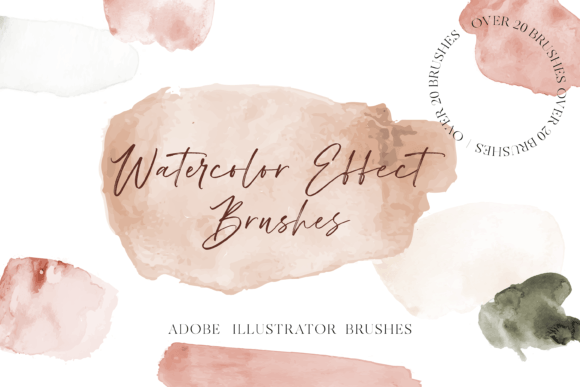
Watercolor is celebrated for its transparency, fluidity, and the way pigments interact with paper. Replicating this effect digitally requires more than just applying a semi-transparent color; it demands a nuanced understanding of how light, texture, and edge variation contribute to the overall aesthetic. High-quality Watercolor brushes for Adobe Illustrator are engineered to mimic these physical properties. They introduce irregular edges, subtle granulation, and varying opacity levels that break up the uniformity typical of standard vector shapes.
The primary advantage of using these brushes is the ability to make designs "pop" without sacrificing the technical benefits of vector files. Unlike raster images, which can lose quality when scaled, vector-based watercolor effects remain crisp and editable at any size. This makes them ideal for a wide range of applications, from small-scale print items like business cards and gift tags to large-format displays such as banners and wall murals. The realistic watercolor texture adds a layer of sophistication and human touch that resonates with audiences seeking authenticity in a increasingly digital world.
Understanding Brush Types: Changeable vs. Fixed Color Strokes
When selecting a brush pack for your workflow, it is crucial to understand the technical distinctions between different brush types. A comprehensive set of Watercolor Brushes for AI typically includes two distinct categories, each serving a specific purpose in the design process.
Color-Changeable Stroke Brushes
The first category consists of brushes where the stroke color is fully customizable. In a standard professional pack, you might find around 25 Watercolor brushes in this group. These are essentially shape-based or art brushes that take on the current stroke color selected in your toolbar. This flexibility is vital for maintaining consistency across a brand identity or illustration. For example, if you are creating a floral illustration, you can use the same brush stroke to create petals in varying shades of pink, red, and orange simply by changing the stroke color. This efficiency speeds up the workflow significantly, allowing for rapid experimentation with color palettes without needing to select new brush presets for every hue.
Fixed Color Texture Brushes
The second category includes brushes where the stroke color is not changeable. A typical set might include 10 Watercolor color brushes of this type. These brushes contain embedded texture and color information, often mimicking specific pigment behaviors or pre-mixed tones. While they lack the flexibility of the changeable strokes, they offer unparalleled realism. These fixed-color brushes are perfect for adding authentic details, such as deep indigo shadows, earthy ochre accents, or specific watery washes that rely on complex multi-tone gradients within a single stroke. They serve as excellent accent tools, adding depth and variation to areas where a flat, single-color stroke might look too artificial.
Practical Applications Across Industries
The versatility of Watercolor brushes for Adobe Illustrator extends far beyond fine art illustration. Their ability to combine scalability with organic texture makes them suitable for a diverse array of professional and hobbyist projects.
- Stationery and Gift Tags: The soft, inviting nature of watercolor is perfectly suited for personal and celebratory items. Designers can create elegant gift tags, wedding invitations, and greeting cards that feel handmade and thoughtful. The brushes allow for the creation of delicate borders, floral accents, and background washes that enhance the emotional resonance of the piece.
- Brand Identity and Packaging: For brands aiming to convey natural, organic, or artisanal values, watercolor elements are highly effective. Cosmetic packaging, food labels, and eco-friendly product branding often utilize these textures to suggest purity and craftsmanship. The ability to scale these vectors ensures that the logo or packaging design looks equally impressive on a small jar label as it does on a large storefront sign.
- Digital Illustration and Storytelling: Children’s book illustrators and concept artists frequently use these brushes to create whimsical backgrounds and character elements. The fluid nature of the strokes helps in depicting clouds, water, foliage, and fabric, adding a narrative quality to the artwork that rigid geometric shapes cannot achieve.
- Web and UI Design: While less common, watercolor textures are increasingly used in web design to create unique hero sections or background elements that break the monotony of flat design trends. When used sparingly, they can guide the user’s eye and add a distinctive visual identity to a website.
Workflow Integration and Technical Compatibility
Integrating these tools into your existing workflow is straightforward, provided you have the correct software version. These brushes are specifically designed to be compatible with Adobe Illustrator CC. This compatibility ensures that users can take advantage of the latest features in the software, such as improved brush engines and global editing capabilities. It is important to note that older versions of Illustrator may not support certain advanced brush attributes, so keeping your software updated is recommended for the best experience.
For those new to custom brushes, the learning curve can seem steep. However, most high-quality packs, including those featuring Watercolor Brushes for AI, come with detailed instructions. These guides typically cover how to install the brushes into your library, how to save them for future projects, and tips on adjusting settings like opacity and blending modes to achieve the desired effect. Following these instructions ensures that the brushes perform as intended, saving time and preventing frustration during the creative process.
Enhancing Designs with Layering and Blending
To truly maximize the potential of Watercolor brushes for Adobe Illustrator, designers should explore techniques beyond simple single-stroke application. The magic of watercolor lies in layering. By overlapping multiple strokes with varying levels of transparency, you can create rich, complex colors and textures that mimic the buildup of pigment on paper.
Consider using the "Multiply" blending mode for your brush strokes. This mode allows colors to darken where they overlap, simulating the way wet paint interacts on physical paper. Additionally, combining the 25 color-changeable brushes with the 10 fixed-color texture brushes can create a dynamic interplay between uniform shapes and organic anomalies. For instance, you might lay down a base wash using a changeable brush to establish the general form, then overlay fixed-color strokes to add grain, splatter, or deep saturation points. This hybrid approach results in a more convincing and visually engaging final piece.
Considerations for Professional Use
While these brushes offer immense creative freedom, there are practical considerations to keep in mind. First, complexity matters. Using hundreds of detailed brush strokes in a single document can increase file size and potentially slow down performance, especially on older hardware. It is advisable to expand appearances only when necessary for final output or when sharing files with clients who may not have the same brush libraries installed.
Furthermore, understanding the context of your audience is key. While watercolor textures add warmth, they may not be suitable for corporate environments requiring strict minimalism or high-tech aesthetics. Evaluating the brand voice and project goals before committing to a watercolor style ensures that the design choices align with the intended message. When used appropriately, however, Watercolor Brushes for AI provide a powerful means of connecting with viewers on an emotional level, transforming standard digital designs into memorable, artistic experiences.
In conclusion, the integration of realistic watercolor textures into vector design represents a significant advancement for digital creators. By leveraging the flexibility of color-changeable strokes and the authenticity of fixed-color textures, designers can produce work that is both technically robust and aesthetically pleasing. From small-scale personal projects to large commercial applications, these tools offer a versatile solution for anyone looking to add a human touch to their digital artwork.