Mastering Digital Typography with Procreate Hand Lettering Brushes
Digital hand lettering has transitioned from a niche hobby to an essential skill for modern creatives, marketers, and entrepreneurs. Whether you are designing social media graphics, creating custom logos, or illustrating educational materials, the quality of your typography often dictates the perceived value of your work. However, the transition from analog pen and paper to a glass screen introduces unique challenges, most notably the lack of tactile friction and the tendency for lines to appear shaky or inconsistent. This is where specialized tools like Procreate Hand Lettering Brushes become indispensable. These resources are not merely aesthetic additions; they are functional instruments designed to streamline the creative process, ensuring that your digital output matches the precision and elegance of traditional calligraphy.
The Role of Specialized Brushes in a Digital Workflow
Integrating Procreate Hand Lettering Brushes into your workflow begins with understanding their specific function within the broader design pipeline. Unlike standard round brushes that mimic basic ink pens, this set of modern calligraphy brushes is engineered to address the mechanical limitations of digital drawing. The primary advantage lies in their ability to offset shakiness and rough edges, common issues when working on a tablet without the resistance of paper. By using brushes specifically calibrated for smooth strokes, you reduce the time spent on post-production cleanup and vectorizing, allowing for a more efficient path from concept to final asset.
For professionals such as freelancers and small business owners, time is a critical resource. A workflow that minimizes technical friction allows you to focus on composition and messaging rather than fighting with line weight consistency. These brushes fit seamlessly into various stages of a project. In the initial sketching phase, they provide a reliable foundation for layout planning. During the execution phase, they deliver clean, confident strokes that require minimal adjustment. Finally, in the refinement stage, the included eraser brush ensures precise corrections without disrupting the surrounding artwork. This holistic approach supports a consistent quality control standard across all your digital deliverables.
Preparation and Setup for Optimal Performance
Before diving into creation, proper preparation ensures that you extract maximum value from your tools. First and foremost, compatibility is key. You must have Procreate installed on your iPad to use this product, as the file format is native to the application. Ensure your software is updated to the latest version to support all brush engine features. Once you have purchased the set, you will receive a Procreate file and instructions. Importing the file is straightforward: simply tap the link or open the file on your iPad, and Procreate will automatically install the brushes into your library.
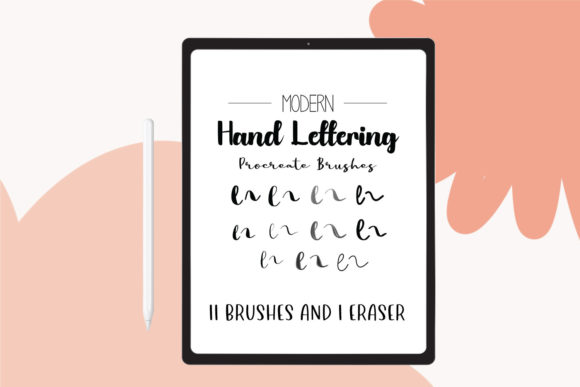
Organization is another crucial aspect of preparation. Upon installation, take a moment to categorize the 11 brushes and the single eraser brush within your Procreate interface. Grouping them in a dedicated folder labeled "Calligraphy" or "Lettering" prevents clutter and speeds up tool selection during intense work sessions. Additionally, familiarize yourself with the pressure sensitivity settings of your Apple Pencil or stylus. While these brushes are designed to smooth out imperfections, adjusting the pressure curve in Procreate’s preferences can further enhance your control, allowing for subtle variations in line weight that add character to your lettering.
Execution Techniques for Clean Lettering
Using Procreate Hand Lettering Brushes effectively requires a shift in technique compared to traditional methods. The digital environment offers unlimited undo options and layer flexibility, which should be leveraged strategically. Start by creating a rough sketch on a lower opacity layer using a standard pencil brush. This step allows you to plan spacing, kerning, and overall composition without the pressure of creating perfect strokes immediately. Once satisfied with the layout, create a new layer above the sketch and begin tracing with the calligraphy brushes.
The set includes 11 distinct brushes, each serving a specific purpose in the lettering process. Some may be optimized for thick downstrokes, while others excel at delicate upstrokes or connectors. Experiment with each brush to understand its unique behavior. For instance, use the heavier brushes for primary stems and serifs, and switch to finer tips for intricate flourishes. The built-in stabilization feature of these brushes helps maintain smooth curves, reducing the physical strain on your hand and wrist. This is particularly beneficial for long work sessions, helping to prevent fatigue and repetitive strain injuries.
When executing complex words or phrases, break them down into individual components. Letter by letter, or even stroke by stroke, build the word on separate layers if necessary. This non-destructive approach allows you to adjust the position and size of individual letters without affecting the rest of the composition. It also simplifies the process of balancing visual weight, ensuring that no single element overwhelms the design. Use the included eraser brush to refine edges and remove overlapping lines, achieving a polished look that mimics high-quality ink on paper.
Integration with Broader Design Projects
Digital hand lettering rarely exists in isolation. It is often part of a larger design ecosystem involving photography, illustration, and graphic elements. Procreate Hand Lettering Brushes integrate smoothly with other assets and platforms. Once your lettering is complete, you can export it as a PNG with a transparent background, making it easy to overlay onto photos, videos, or web designs. This versatility makes the brushes ideal for content creators who need consistent branding across multiple channels, from Instagram stories to blog headers.
For educators and publishers, these brushes facilitate the creation of engaging visual aids. Custom lettering can highlight key concepts, create memorable titles, or add a personal touch to educational materials. The consistency provided by the brush set ensures that all visual elements maintain a cohesive style, reinforcing brand identity or thematic unity. Moreover, the ability to quickly iterate on designs allows for rapid prototyping and feedback incorporation, a valuable asset in collaborative environments where decisions need to be made swiftly.
Entrepreneurs and marketers can leverage these tools to create unique promotional materials without relying heavily on external designers. By mastering Procreate Hand Lettering Brushes, you gain the autonomy to produce high-quality visuals in-house, reducing costs and turnaround times. Whether designing quote graphics for social media engagement or crafting personalized email headers, the professional finish provided by these brushes enhances credibility and audience connection.
Maintaining Consistency and Quality Control
Long-term use of any creative tool requires attention to consistency and quality control. As you incorporate Procreate Hand Lettering Brushes into your regular routine, develop a checklist for reviewing your work. Check for uniform stroke weights, balanced spacing, and alignment. Use Procreate’s drawing guides and symmetry tools to assist in maintaining structural integrity. Regularly compare new pieces against previous works to identify areas for improvement and ensure that your style remains recognizable and coherent.
Additionally, keep your digital workspace organized. Save your favorite color palettes and layer structures as templates to speed up future projects. Archive completed projects systematically, noting which brushes were used for specific effects. This documentation serves as a valuable reference library, allowing you to replicate successful techniques and troubleshoot issues efficiently. Over time, this disciplined approach transforms occasional experimentation into a reliable, scalable production process.
Maximizing Value Through Practice and Exploration
While the tools themselves are powerful, their true potential is unlocked through practice and exploration. Dedicate time to experiment with different combinations of the 11 brushes. Try varying angles, speeds, and pressure levels to discover new stylistic possibilities. Challenge yourself to create lettering in different contexts, such as monograms, headlines, and decorative borders. This diverse practice builds muscle memory and deepens your understanding of how each brush behaves under different conditions.
Furthermore, stay engaged with the broader community of digital letterers. Share your work, seek feedback, and observe how others utilize similar tools. Learning from peers can introduce new techniques and workflows that enhance your own practice. Remember that mastery is a gradual process. Embrace mistakes as learning opportunities, and use the flexibility of digital media to iterate and improve continuously. With patience and persistence, Procreate Hand Lettering Brushes will become an extension of your creative voice, enabling you to produce stunning, professional-grade typography with confidence and ease.