Mastering the Procreate Eyelashes Stamp Brushes Set for Efficient Digital Illustration
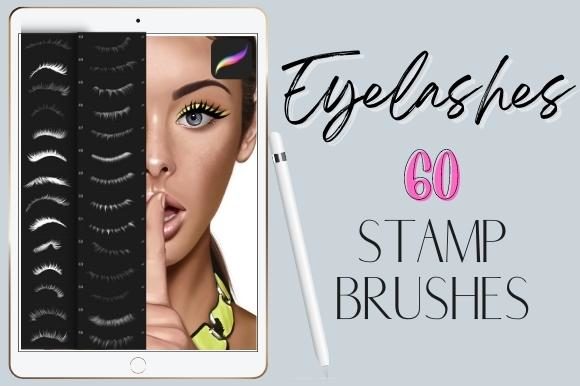
Digital illustration has evolved from a niche hobby into a robust professional workflow for concept artists, character designers, and beauty illustrators. Within this ecosystem, efficiency is not merely a convenience; it is a critical component of profitability and creative sustainability. One specific tool that has gained traction among iPad-based artists is the Procreate Eyelashes Stamp Brushes Set. This collection, featuring 60 realistic eyelashes stamp brushes for Procreate, offers a streamlined approach to one of the most tedious aspects of portrait and character design: rendering detailed lashes.
Understanding how to integrate these digital assets into a broader creative pipeline requires more than just downloading a file. It demands a strategic approach to layer management, composition, and stylistic consistency. This article explores the practical implementation of the Procreate Eyelashes Stamp Brushes Set, focusing on how it fits into real-world workflows, enhances productivity, and maintains high-quality artistic standards.
Understanding the Asset and Its Role in Workflow
The Procreate Eyelashes Stamp Brushes Set is a specialized digital tool designed exclusively for the Procreate application on iPad. It includes 60 distinct brushes, covering both top and bottom lashes in various styles, densities, and curls. It is crucial to note that these are not standalone images but functional brush presets that interact with Procreate’s engine. They will not work in other applications such as Photoshop, Clip Studio Paint, or Affinity Designer.
In a typical illustration process, drawing individual eyelashes manually can consume hours. Each lash requires precise pressure control, tapering, and directional accuracy. For professionals working under tight deadlines, this manual repetition can lead to fatigue and inconsistent results. The stamp brush set addresses this bottleneck by providing pre-rendered, high-fidelity lash clusters that can be placed with a single tap. This shifts the artist’s role from manual renderer to art director, allowing for faster iteration and greater focus on overall composition and lighting.
Preparation and Compatibility Considerations
Before integrating the Procreate Eyelashes Stamp Brushes Set into your workflow, ensure your technical environment is optimized. Since these brushes are exclusive to Procreate, you must have an iPad compatible with the latest version of the app. Older iPad models may experience latency when handling complex stamp brushes, which can disrupt the fluidity of the creative process.
Organization is key to efficient retrieval. Upon installation, create a dedicated brush group within your Procreate library. Labeling this group clearly—such as "Lash Stamps" or "Beauty Assets"—prevents clutter and reduces search time during active projects. Additionally, consider creating a reference sheet. Take a blank canvas and stamp each of the 60 brushes once, labeling them by style (e.g., "Natural Top," "Dramatic Bottom," "Sparse Lower"). This visual index serves as a quick lookup table, eliminating the need to test each brush individually during a client project.
Integrating Stamps into the Illustration Process
The effective use of the Procreate Eyelashes Stamp Brushes Set depends on where it sits in your production timeline. It is rarely the first step. Instead, it functions best during the refinement phase, after the underlying eye structure, skin tones, and shading are established.
Step 1: Establishing the Base
Begin by painting the eye socket, iris, and sclera using standard round or textured brushes. Ensure the eyelid crease and shadow areas are defined. The lash line should be sketched lightly to indicate direction and density. This foundational layer provides the context necessary for placing stamps accurately.
Step 2: Strategic Placement
Create a new layer specifically for eyelashes. Naming this layer "Lashes_Top" or "Lashes_Bottom" facilitates non-destructive editing. Select a brush from the Procreate Eyelashes Stamp Brushes Set that matches the desired aesthetic. For a natural look, choose sparser stamps; for editorial or fantasy styles, opt for denser clusters. Tap along the lash line, varying the angle slightly to mimic natural growth patterns. Avoid perfect symmetry, as human eyes are inherently asymmetrical.
Step 3: Customization and Blending
Raw stamps can appear flat if left unmodified. Use Procreate’s transform tools to rotate, scale, or flip individual stamps for variety. Apply layer effects such as "Multiply" or "Overlay" to blend the lashes with the underlying skin tones. Adjust the opacity to soften harsh edges. For added realism, use a soft eraser brush to fade the base of the lashes into the eyelid, creating a seamless transition.
Enhancing Realism Through Layering Techniques
While the Procreate Eyelashes Stamp Brushes Set provides excellent base structures, true realism often requires hybrid techniques. Relying solely on stamps can result in a repetitive or "sticker-like" appearance. To mitigate this, combine stamps with hand-drawn elements.
After placing the main lash clusters, create a new layer above the stamps. Using a fine, pressure-sensitive brush, draw individual stray lashes extending from the stamped clusters. These imperfections break up uniformity and add organic texture. Additionally, vary the color of the lashes. Instead of pure black, use dark brown, charcoal, or even subtle hints of blue or purple, depending on the lighting and character design. This nuanced approach elevates the final output from a digital composite to a cohesive illustration.
Workflow Efficiency and Quality Control
For freelancers and small business owners, time is a direct financial metric. The Procreate Eyelashes Stamp Brushes Set significantly reduces the time spent on repetitive tasks, allowing for higher throughput without sacrificing quality. However, efficiency must not compromise consistency. Establish a personal quality control checklist:
- Directionality: Do the lashes follow the curvature of the eyelid?
- Density: Is the balance between top and bottom lashes appropriate for the character’s age and style?
- Integration: Are the shadows and highlights on the lashes consistent with the light source of the entire piece?
- Resolution: Are the stamps crisp at the intended print or display size?
Regularly reviewing your work against these criteria ensures that the use of automation tools does not lead to complacency. It encourages mindful application rather than mindless stamping.
Long-Term Value and Asset Management
Investing in specialized tools like the Procreate Eyelashes Stamp Brushes Set yields long-term benefits beyond immediate time savings. As you build a portfolio, having a consistent method for rendering details helps establish a recognizable style. Clients appreciate reliability, and a streamlined workflow allows you to meet deadlines with greater ease.
Furthermore, digital assets are scalable. Once you master the integration of these lash brushes, you can apply similar logic to other elements, such as eyebrows, hair strands, or fabric textures. The skills developed in managing layers, blending modes, and customization transfer across different types of digital assets. This holistic improvement in technical proficiency enhances your overall value as a creator.
It is also worth noting that digital tools evolve. Keep your Procreate app updated to ensure compatibility with new brush features. Occasionally revisit your brush library to retire unused presets and highlight favorites. This maintenance keeps your workspace clutter-free and mentally manageable, supporting sustained creativity over years of practice.
Conclusion
The Procreate Eyelashes Stamp Brushes Set is more than a collection of 60 realistic eyelashes stamp brushes for Procreate; it is a strategic asset for modern digital artists. By understanding its place in the workflow, preparing your technical environment, and combining stamps with manual refinement, you can achieve professional-grade results efficiently. Whether you are a freelancer managing multiple clients, an educator demonstrating digital techniques, or a hobbyist refining your craft, integrating these tools thoughtfully enhances both your process and your final output. Embrace the balance between automation and artistry, and let these brushes serve as a foundation for your continued creative growth.