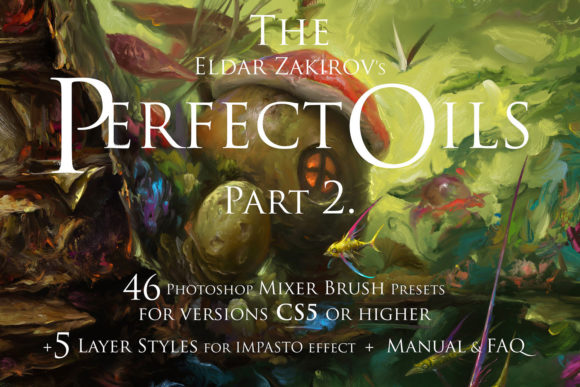
Perfect Oils 2: 46 Photoshop Oil Brushes
Digital painting has long struggled to replicate the tactile, unpredictable beauty of traditional media. While standard digital brushes offer precision, they often lack the organic resistance and fluid blending that define oil and acrylic painting on canvas. This is where Perfect Oils 2 steps in, bridging the gap between pixel-perfect control and the messy, expressive nature of real-world art supplies. Specifically designed for Photoshop CS5 and later versions, this toolset includes 46 Mixer Brush presets and five impasto layer styles, offering a simulation of liquid soft paint that feels remarkably authentic.
Understanding the Toolset
At its core, Perfect Oils 2 is not just a collection of static stamps or textured tips. It leverages the Mixer Brush engine in Photoshop to simulate the physical properties of paint. When you stroke the canvas, the brush doesn't just deposit color; it interacts with the pixels already there. This allows for simple color blending directly on the canvas, mimicking the way a painter mixes hues on a palette or blends wet paint on a surface. The result is a "liquid soft paint sensation" that responds to pressure, speed, and direction, enabling both expressive, thick strokes and soft, subtle gradients.
The package includes a TPL file containing the 46 Mixer Brush presets, an ASL file with five layer styles for creating thick paint relief (impasto), a JPG reference list, and a comprehensive PDF manual. This combination provides a complete ecosystem for artists looking to elevate their digital workflow beyond flat, uniform coloring.
Why Different Creators Care
The value of a specialized brush set varies significantly depending on who is holding the stylus. For a beginner, the primary concern is often the learning curve. Traditional oil painting requires knowledge of mediums, drying times, and complex layering techniques. Perfect Oils 2 abstracts these technical hurdles, allowing novices to achieve realistic results without the mess or cost of physical supplies. The included documentation and FAQs are crucial here, guiding new users through setup and basic techniques, ensuring they do not feel overwhelmed by the software’s capabilities.
For professional illustrators and concept artists, the priority shifts to efficiency and style. Time is money, and the ability to paint realistically without spending hours manually blending gradients is a significant advantage. These users evaluate the tool based on its flexibility. Can the brushes handle both rough sketching and refined detailing? The answer lies in the variety of the 46 presets. Some are designed for broad, expressive coverage, while others allow for fine, controlled lines. This versatility helps professionals form a unique painting style that stands out in a crowded market, offering a life-like sketching and painting process that clients often associate with high-value traditional art.
The Hobbyist and the Entrepreneur
Hobbyists often seek joy and relaxation in their creative pursuits. For them, the "rich creative opportunities" provided by Perfect Oils 2 are about exploration. The tool encourages experimentation. Because the mixer brushes allow for painting and mixing new colors right into existing layers, users can play with color theory in a low-stakes environment. There is no waste of expensive tubes of paint, and mistakes are easily undone. This freedom fosters creativity and helps hobbyists develop confidence in their artistic voice.
On the other hand, entrepreneurs and small business owners who create their own marketing materials or product designs may view this tool through the lens of brand differentiation. In a digital world saturated with clean, vector-based graphics, a hand-painted aesthetic can convey warmth, authenticity, and craftsmanship. Using Perfect Oils 2 to create textured backgrounds, custom logos, or promotional art can help a brand feel more human and approachable. The impasto layer styles, in particular, add a three-dimensional quality that can make digital assets pop on social media feeds or websites, grabbing attention in a way that flat design cannot.
Educators and Content Creators
Educators teaching digital art face the challenge of demonstrating complex concepts like light, shadow, and texture. Perfect Oils 2 serves as an excellent teaching aid because it visualizes these principles intuitively. When an instructor demonstrates how light hits a thick ridge of paint using the impasto styles, students can immediately see the impact of texture on perception. The tool simplifies the explanation of how traditional media behaves, making it easier to translate those lessons into the digital realm.
Similarly, bloggers and content creators who produce tutorials or time-lapse videos benefit from the visual appeal of the brushes. The process of watching colors blend and textures build up is inherently engaging for audiences. Using a tool that mimics real oils allows creators to produce content that is not only informative but also visually satisfying, increasing viewer retention and engagement.
Evaluating Quality and Usability
When considering whether Perfect Oils 2 matches your goals, it is essential to look at the specific features that drive its performance. The realism of the oil and acrylic imitation is the standout feature. Unlike standard brushes that simply change opacity or flow, these mixer brushes calculate the interaction between the brush tip and the canvas pixels. This means that dragging a blue brush over a yellow area will naturally create green, just as it would in real life. This dynamic behavior helps to paint more realistic images with less manual effort.
The inclusion of five impasto layer styles is a significant bonus. Impasto refers to the technique of laying paint on an area of the surface in very thick layers, usually thick enough that the brush or painting-knife strokes are visible. In digital art, achieving this effect typically requires complex manual highlighting and shadowing. The provided layer styles automate much of this process, adding depth and relief to your strokes instantly. This feature is particularly useful for artists who want to emphasize the physicality of their work, creating a sense of touch and presence in a two-dimensional medium.
Making the Right Choice for Your Workflow
To determine if this toolset is right for you, consider your current workflow and desired outcomes. If you are struggling with flat, lifeless digital paintings, Perfect Oils 2 offers a direct solution. It introduces chaos and organic variation into your work, which can break the sterile feel of digital art. If you are a traditional painter transitioning to digital, these brushes will feel familiar, reducing the friction of adapting to a new medium.
However, it is important to note that this tool requires Photoshop CS5 or later, as it relies on the Mixer Brush feature introduced in that version. Users with older software or those preferring other platforms like Procreate or Clip Studio Paint will need to look elsewhere. Additionally, while the tool simplifies blending, it does not replace the need for fundamental artistic skills. Understanding color theory, composition, and light remains essential. The brushes are a means to an end, enhancing your ability to express your vision rather than creating the art for you.
Ultimately, Perfect Oils 2 is about expanding your creative palette. Whether you are a freelancer looking to offer a new style to clients, a student eager to learn realistic painting techniques, or a hobbyist seeking a new way to relax, this toolset provides the resources to explore the rich, textured world of digital oil painting. By combining powerful mixer brushes with easy-to-use impasto effects, it offers a comprehensive solution for anyone serious about elevating their digital art practice.