Spring Flowers Procreate Pattern Brushes
Digital illustration has evolved rapidly, offering tools that mimic traditional media while providing the flexibility and efficiency of modern technology. For artists, designers, and hobbyists who use the iPad, finding the right assets can transform a tedious workflow into a joyful creative experience. One such asset that has gained significant traction among the creative community is the Spring Flowers Procreate Pattern Brushes collection. This set is not just a bundle of stamps; it is a carefully curated toolkit designed to help users create seamless, organic floral patterns with minimal effort and maximum artistic control.
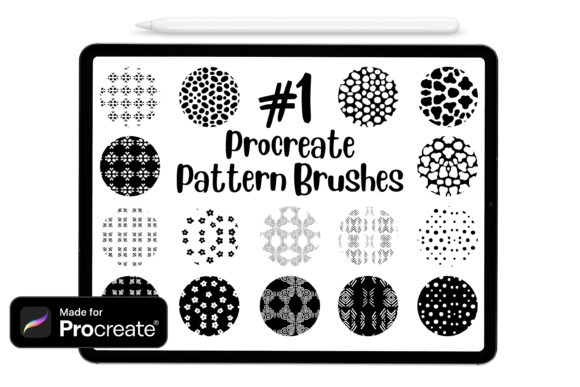
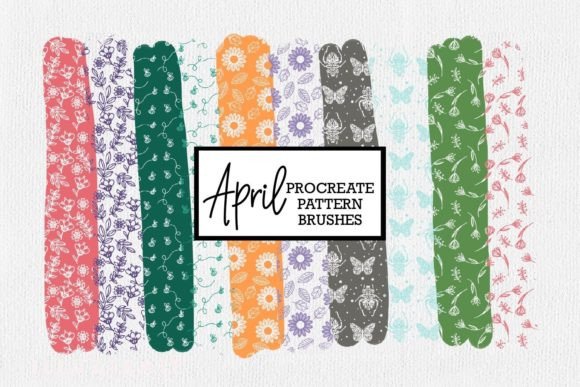
These brushes have been specifically engineered for use within the Procreate app, ensuring compatibility and smooth performance on your device. Whether you are a seasoned illustrator looking to speed up your background work or a beginner eager to create beautiful greeting cards, this collection offers a versatile solution. The package includes ten distinct brushes, each available in both filled and transparent versions, allowing for endless customization possibilities.
Understanding the Value of Digital Pattern Brushes
Creating floral patterns from scratch can be time-consuming. Drawing individual petals, leaves, and stems repeatedly requires precision and patience. Even for skilled artists, maintaining consistency across a large canvas is challenging. This is where pattern brushes shine. A pattern brush automatically repeats a designated shape along a path, creating a continuous design that looks hand-drawn but is generated instantly.
The Spring Flowers Procreate Pattern Brushes simplify this process significantly. Instead of drawing every flower individually, you select a brush, choose your color, and stroke across the canvas. The result is a cohesive, flowing arrangement of blooms that feels natural and organic. This efficiency does not come at the cost of quality. Each brush in the collection retains the delicate textures and irregularities found in nature, avoiding the rigid, computer-generated look that often plagues lower-quality digital assets.
For entrepreneurs and small business owners, time is money. Being able to generate high-quality decorative elements quickly means you can take on more projects, meet tighter deadlines, and focus your energy on the unique aspects of your design rather than repetitive tasks. For educators and students, these brushes serve as an excellent tool for learning about composition, color theory, and digital layering without getting bogged down in technical drawing difficulties.
Key Features and Practical Benefits
What sets this particular collection apart is its thoughtful design and user-friendly structure. Here is a closer look at what makes these brushes a valuable addition to your digital library:
- Direct iPad Integration: The files are optimized for direct download to your iPad. Once downloaded, importing them into your Procreate brush library is a straightforward process, allowing you to start creating almost immediately.
- Dual Versions for Flexibility: Each of the ten brushes comes in two variations: filled and transparent. The filled version provides solid, opaque colors, ideal for bold statements and clear definitions. The transparent version allows underlying layers to show through, creating depth and subtle blending effects. This duality gives you greater control over the visual weight of your designs.
- Color Customization: Unlike static clipart, these brushes are fully dynamic. You select your color using Procreate’s robust color picker, meaning you are not limited to predefined palettes. Want pastel pinks for a soft spring vibe? Or vibrant oranges for a summer feel? The choice is entirely yours.
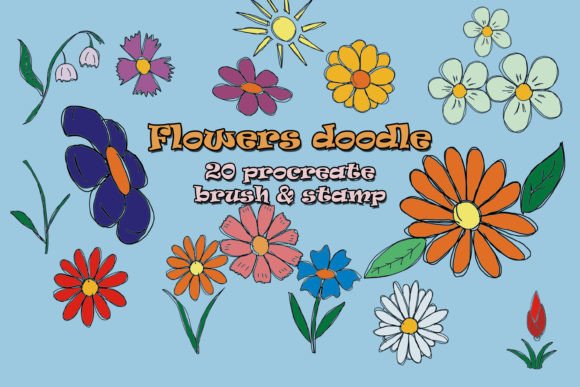
- Organic Aesthetics: The designs capture the essence of spring flora, featuring varied petal shapes and leaf structures. They are designed to look hand-sketched, adding a personal touch to digital works that often feels missing in purely vector-based tools.
Creative Applications and Use Cases
The versatility of the Spring Flowers Procreate Pattern Brushes means they can be applied across a wide range of projects. Here are several practical ways creators are using this tool:
Stationery and Greeting Cards
One of the most popular uses for floral brushes is in the design of printable stationery. Wedding invitations, birthday cards, and thank-you notes benefit greatly from delicate floral borders and backgrounds. By using the transparent brush versions, designers can layer flowers over textured paper backgrounds to create a sophisticated, layered look that mimics traditional watercolor or ink techniques.
Social Media Content
Bloggers, marketers, and influencers constantly need fresh visuals for Instagram posts, Pinterest pins, and story highlights. Floral frames and dividers created with these brushes can elevate simple text posts, making them more engaging and visually appealing. The ability to quickly change colors allows content creators to match their brand palette or seasonal trends effortlessly.
Textile and Surface Design
For those interested in print-on-demand services or textile design, these brushes offer a quick way to prototype patterns. While final production files may require additional vectorizing steps, the initial concept phase can be accelerated significantly using Procreate. Designers can experiment with different layouts, densities, and color combinations to find the perfect repeat pattern before moving to more complex software.
Digital Planning and Journaling
The digital planning community has grown exponentially, with many users creating custom planners and journals on their iPads. Adding floral accents to weekly spreads, habit trackers, or cover pages adds a personalized, aesthetic touch. The ease of use makes these brushes accessible even to those who do not consider themselves illustrators.
Tips for Getting the Most Out of Your Brushes
To ensure you achieve the best results with your new tools, consider the following practical advice:
- Experiment with Opacity and Flow: Do not stick to default settings. Adjusting the opacity and flow of your brush stroke can create softer, more ethereal effects, especially when using the transparent versions. This is particularly effective for creating background washes or dreamy landscapes.
- Layering is Key: Combine different brushes from the set. Use a larger, sparser brush for the base layer and a smaller, denser brush for details. Layering different sizes and colors adds depth and realism to your patterns.
- Mind the Scale: Procreate allows you to adjust the size of your brush dynamically. Test different scales to see how the pattern repeats. Sometimes, a larger scale creates a bold, modern look, while a smaller scale offers a delicate, vintage feel.
- Use Clipping Masks: When applying these patterns to specific shapes, such as text or geometric forms, use clipping masks. This ensures your floral designs stay within the boundaries of your chosen shape, keeping your workspace clean and organized.
Important Considerations Before You Start
While these brushes are powerful, it is important to understand their limitations and requirements. First, they are designed exclusively for Procreate. If you use other digital art software like Photoshop or Clip Studio Paint, these specific files will not be compatible. Ensure you have the Procreate app installed on your iPad before purchasing or downloading.
Secondly, while the brushes simplify the creation process, they do not replace fundamental design principles. Understanding color harmony, balance, and composition will still enhance the quality of your final output. Take time to study how light interacts with flowers and how colors complement each other to make your designs stand out.
Finally, always check the licensing terms associated with digital assets. While many creators allow commercial use of artwork made with their brushes, it is essential to confirm whether you can sell the brushes themselves (usually prohibited) or if there are restrictions on mass-produced items. Respecting intellectual property rights supports the creative ecosystem and ensures continued availability of high-quality tools.
In conclusion, the Spring Flowers Procreate Pattern Brushes offer a blend of convenience, beauty, and flexibility. They empower creators of all skill levels to produce professional-quality floral designs with ease. By integrating these tools into your workflow, you can unlock new creative possibilities, save valuable time, and bring a touch of spring to your digital projects year-round.