Unlocking Magic: A Guide to Using Fairy Wings Stamp Brushes for Procreate
In the rapidly evolving world of digital art, tools that bridge the gap between technical skill and imaginative vision are invaluable. For artists using the iPad and Apple Pencil, Procreate has become the industry standard, offering a canvas limited only by one’s creativity. Among the vast array of assets available to enhance this experience, specialized stamp brushes have emerged as a favorite for adding instant atmosphere and detail. Specifically, the Fairy Wings Stamp Brushes offer a unique way to inject whimsy and ethereal beauty into digital illustrations. This guide explores what these brushes are, why they are significant for modern digital artists, and how you can use them to create stunning, magical imagery.
What Are Fairy Wings Stamp Brushes?
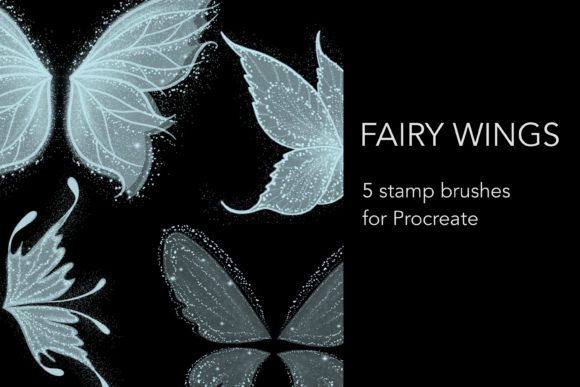
At their core, stamp brushes in Procreate are pre-designed textures or shapes that can be "stamped" onto your canvas with a single tap. Unlike traditional painting brushes that require stroke dynamics and manual shaping, stamp brushes provide a complete element instantly. The Fairy Wings Stamp Brushes are a curated collection designed specifically to replicate the delicate, translucent, and intricate structures of mythical fairy wings.
This specific package includes one .brushset file containing five distinct stamp brushes. Each brush within the set offers a different variation of wing structure, allowing for diversity in your character designs or background elements. Whether you are designing a high-fantasy character, creating a dreamy landscape, or adding subtle magical effects to a portrait, these brushes serve as a foundational tool for achieving a professional, enchanted look without spending hours drawing complex vein patterns from scratch.
The Significance of Specialized Assets in Digital Art
One might ask, why use a stamp brush instead of drawing wings manually? The answer lies in efficiency and consistency. Drawing realistic or stylized insectoid or fairy wings requires a deep understanding of anatomy, symmetry, and light refraction. For beginners, this can be a daunting task that often leads to frustration. For experienced professionals, it can be time-consuming when working on tight deadlines.
By utilizing the Fairy Wings Stamp Brushes, artists can bypass the tedious structural phase and focus on integration and lighting. This aligns with the modern workflow of digital creation, where leveraging high-quality assets allows creators to produce more work in less time. It democratizes high-level fantasy art, making it accessible to hobbyists while providing a reliable shortcut for commercial illustrators.
Why Dark Backgrounds Enhance Magical Effects
A crucial aspect of using these brushes effectively is understanding their visual behavior. The documentation for this set notes that fairy wings look the most beautiful on dark backgrounds. This is not merely a stylistic suggestion but a principle of digital color theory and light simulation.
Fairy wings are typically depicted as translucent, glowing, or iridescent. In real-world physics, light is most visible against contrast. When you place a semi-transparent, glowing wing against a black or deep navy background, the luminosity pops. The dark backdrop absorbs ambient light, allowing the viewer’s eye to focus entirely on the illuminated details of the wing structure. On a white or light background, these subtle glows and transparent layers can appear washed out or invisible.
To maximize the impact of your Fairy Wings Stamp Brushes:
- Use Deep Colors: Start with backgrounds in shades of midnight blue, deep purple, charcoal, or pure black.
- Adjust Layer Modes: Experiment with blending modes like Screen, Add, or Color Dodge to make the wings appear as if they are emitting their own light.
- Add Glow Effects: Use the Gaussian Blur tool slightly on a duplicate layer to create a soft halo around the wings, enhancing the magical aesthetic.
Step-by-Step: Creating Your Own Magical Images
Creating a cohesive illustration using the Fairy Wings Stamp Brushes involves more than just placing the stamp on the canvas. To achieve a professional result, you must integrate the wings into the scene logically. Here is a practical workflow for beginners and intermediate users alike.
- Install the Brush Set: Download the .brushset file and import it into Procreate by tapping the wrench icon, selecting "Add," and choosing "Import." You will now see five new brushes in your library.
- Set Your Canvas: Create a new canvas. For best results, choose a dark background color. This sets the stage for the luminous quality of the wings.
- Select and Stamp: Choose one of the five wing variations. Tap the screen to place the wing. Remember that stamp brushes can usually be resized and rotated after placement using the Transform tool (the arrow icon).
- Positioning and Symmetry: If you are attaching wings to a character, place one wing, then duplicate the layer. Flip the duplicated layer horizontally to create a matching pair. Align them carefully to the character’s back.
- Customization: No two fairies are alike. Use the Hue, Saturation, and Brightness adjustments to change the color of the wings to match your character’s palette. You might want pink gossamer wings for a spring fairy or icy blue ones for a winter spirit.
- Blending and Lighting: This is the most critical step. Lower the opacity of the wing layer slightly to allow the background or character clothing to show through, enhancing transparency. Add a new layer above the wings, set to "Overlay" or "Soft Light," and paint with a soft brush to add highlights where light would naturally hit the wing membranes.
Common Misunderstandings About Stamp Brushes
There is a lingering misconception in the art community that using stamp brushes is "cheating" or lacks artistic merit. This view overlooks the true purpose of digital tools. Stamp brushes are not replacements for artistic vision; they are accelerators. The artistic value comes from how you use the asset—how you light it, color grade it, composite it, and integrate it into a narrative scene.
Furthermore, some users assume that stamp brushes are rigid and unchangeable. In reality, Procreate’s powerful transformation and adjustment tools allow you to warp, recolor, and blend these stamps until they are unrecognizable from their original form. The Fairy Wings Stamp Brushes are starting points, not final products. They invite you to iterate and customize, ensuring that your final image remains unique to your style.
Practical Applications Beyond Character Design
While the primary use case for Fairy Wings Stamp Brushes is character illustration, their utility extends into various creative fields. Understanding these broader applications can help you get more value from your purchase.
Graphic Design and Branding: For brands focusing on wellness, spirituality, or fantasy gaming, these wings can be incorporated into logos or social media graphics to convey a sense of lightness and magic.
Photo Manipulation: Photographers who edit portraits can use these stamps to add fantastical elements to real-life photos. By masking the wings behind a subject and adjusting the lighting to match the photo’s source, you can create surreal, magazine-quality edits.
Educational Content: Educators teaching digital art can use these brushes to demonstrate concepts of layering, transparency, and blending modes. They provide an immediate visual reward for students learning complex software interfaces.
Conclusion: Embracing Digital Magic
The Fairy Wings Stamp Brushes for Procreate represent more than just a digital asset; they are a gateway to enhanced creativity. By providing five distinct, high-quality wing designs in a single .brushset, this tool removes technical barriers and allows artists to focus on storytelling and atmosphere. Whether you are a beginner looking to create your first magical character or a seasoned illustrator seeking to streamline your workflow, these brushes offer a versatile solution.
Remember, the key to mastering these tools lies in experimentation. Play with dark backgrounds, explore different blending modes, and do not be afraid to modify the stamps to suit your vision. In the realm of digital art, magic is not just about the tools you use, but how you wield them. With these fairy wings, you are equipped to bring a touch of the ethereal to every canvas you touch.
For those interested in expanding their digital toolkit, exploring how stamp brushes interact with other Procreate features like layer masks and animation assist can open up even more possibilities for dynamic, moving artwork. Start creating your own magical images today and let your imagination take flight.