Easter Brushes Stamp: A Practical Guide to Using Procreate Stamps for Holiday Designs
Digital illustration has transformed how we approach seasonal design, offering speed and flexibility that traditional media simply cannot match. Among the most efficient tools for this workflow are specialized stamp brushes. The Easter Brushes Stamp collection is a prime example of how targeted digital assets can streamline your creative process. However, many creators rush into downloading and using these tools without fully understanding their limitations or best practices. This often leads to frustration, repetitive-looking designs, or compatibility issues that waste valuable time.
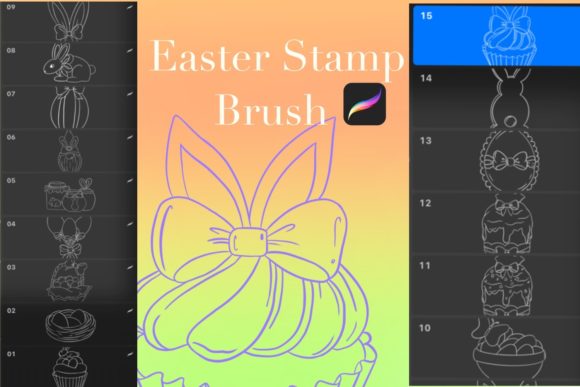
If you are considering adding these fifteen Easter-themed stamps to your Procreate library, it is essential to look beyond the preview images. Understanding the technical requirements and artistic nuances will help you avoid common pitfalls. This guide walks you through what you need to know before you start stamping, ensuring your holiday graphics, greeting cards, and social media posts look professional and polished.
Understanding Compatibility and Technical Requirements
The most frequent mistake beginners make is assuming digital brushes are universal. They are not. This specific Easter Brushes Stamp set is compatible only with the Procreate app. If you are using Adobe Fresco, Photoshop, Clip Studio Paint, or any other software, these files will not work. Attempting to import them into unsupported programs results in error messages or corrupted files, leading to unnecessary confusion.
To use these brushes effectively, you must have the correct hardware and software setup. Specifically, you need:
- An iPad capable of running the latest version of Procreate.
- The Procreate app installed and updated.
- An Apple Pencil or a compatible stylus for precise placement.
While you can tap stamps onto the canvas with your finger, using an Apple Pencil provides the control necessary for layering elements without accidental smudges or misplacements. Furthermore, ensure your iPad has enough storage space. Although the download is a single ZIP compressed file, unpacking it requires temporary space. Always verify your device’s capacity before purchasing or downloading large asset packs to prevent installation failures.
Avoiding the "Copy-Paste" Aesthetic
Stamp brushes are designed for efficiency, but efficiency should not come at the cost of creativity. A common misunderstanding among new users is that stamps are meant to be dropped onto the canvas unchanged. When you use the eleven included brush stamps repeatedly without modification, your design can look mechanical and generic. This "copy-paste" aesthetic is immediately recognizable and often lowers the perceived value of your work, whether you are creating a personal greeting card or a marketing graphic for a small business.
To avoid this, treat stamps as building blocks rather than final products. Here are practical ways to enhance your stamped elements:
- Vary the Opacity: Lowering the opacity of certain stamps allows them to blend into backgrounds, creating depth and texture rather than sitting flatly on top of the design.
- Change Colors: Do not stick to the default black or white. Use the color picker to sample hues from your palette, ensuring the stamps integrate seamlessly with your overall composition.
- Rotate and Scale: Never place two identical stamps in the same orientation. Rotate eggs, bunnies, or flowers by slight degrees and vary their size to create a natural, organic feel.
- Layering: Place some stamps behind text or other elements. This creates a sense of dimension and makes the design feel more cohesive.
By applying these adjustments, you transform simple clip-art-style images into custom illustrations that reflect your unique style.
File Management and Installation Errors
Another overlooked detail involves file management. The Easter Brushes Stamp set comes in a ZIP compressed file. Many users, particularly those less familiar with iOS file systems, struggle with this format. If you try to open the ZIP file directly within Procreate, it will fail. You must first extract the contents using the Files app on your iPad.
Here is the correct workflow to avoid installation headaches:
- Download the ZIP file to your iPad’s Files app.
- Tap the ZIP file to automatically extract it. You should now see a
.brushsetfile. - Tap the
.brushsetfile. It should automatically open Procreate and install the brushes.
If you skip the extraction step, you will not be able to access the eleven brush stamps. Additionally, always back up your brush sets. Digital assets can sometimes become corrupted or lost during app updates. Keeping a copy of the original ZIP file in a cloud storage service ensures you can reinstall the Easter Brushes Stamp collection if needed, protecting your investment and workflow continuity.
Choosing the Right Projects for Stamp Brushes
Not every project benefits from stamp brushes. Using them inappropriately can clutter your design and distract from your main message. For instance, complex photographic compositions may clash with the flat, vector-like nature of many stamp brushes. Conversely, these stamps excel in specific contexts:
Greeting Cards: The playful nature of Easter motifs like bunnies and eggs fits perfectly with handwritten typography and pastel backgrounds. Stamps allow you to quickly frame text or add decorative borders without drawing each element by hand.
Social Media Graphics: When creating Instagram stories or Pinterest pins, speed is crucial. These stamps enable you to produce high-quality, themed content in minutes, helping marketers and bloggers maintain consistency during the holiday rush.
Educational Materials: Teachers and educators can use these stamps to create engaging worksheets or visual aids for young students. The clear, recognizable shapes are ideal for coloring pages or interactive digital lessons.
Before starting a project, ask yourself if the stamp style aligns with your brand or message. If your brand is minimalist and serious, heavy-handed Easter graphics might dilute your identity. In such cases, use the stamps sparingly as subtle accents rather than focal points.
Evaluating Quality and Usability
When evaluating any digital asset, including this Easter Brushes Stamp set, look beyond the number of items included. This pack offers eleven distinct stamps, which is a manageable number that prevents choice paralysis while providing enough variety for diverse designs. However, quantity does not equal quality.
Check the resolution and edge quality of the stamps. Poorly made stamps can appear pixelated when scaled up or have jagged edges that look unprofessional in print. Since these are designed for Procreate, they should retain clarity at various sizes, but it is wise to test them on a blank canvas before committing to a final design. Print a test page if you intend to use them for physical greeting cards to ensure the ink density and detail hold up on paper.
Additionally, consider the versatility of the shapes. Are they too specific? A stamp that is overly detailed might only work in one context. The best stamps are flexible enough to be colored, cropped, and combined. This set aims for that balance, offering recognizable Easter symbols that can be adapted to various color schemes and design styles.
Making an Informed Decision
Ultimately, the value of the Easter Brushes Stamp collection depends on your workflow and needs. If you are a professional illustrator who prefers drawing every element from scratch, these stamps may offer limited utility. However, for entrepreneurs, bloggers, educators, and hobbyists looking to enhance their digital designs efficiently, this tool is invaluable.
Before downloading, ensure you have the required iPad and Procreate setup. Plan to spend time experimenting with opacity, rotation, and color to avoid generic results. Manage your files correctly by extracting the ZIP archive properly. By approaching these digital tools with intention and technique, you can elevate your Easter-themed creations from amateur to professional, saving time while maintaining high artistic standards.