Awesome Brushes Vol1: A Versatile Toolset for Digital Artists
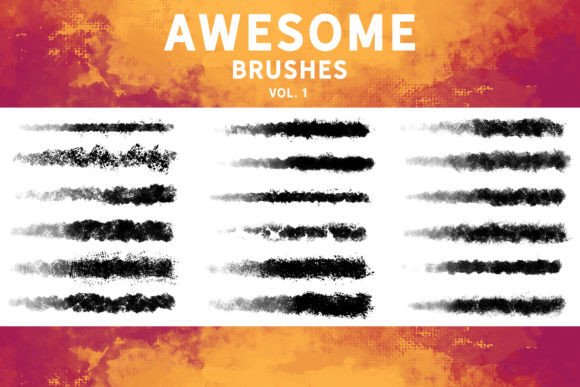
Digital art tools have evolved significantly, moving beyond simple pixel manipulation to emulate the tactile nuances of traditional media. For artists seeking a bridge between analog texture and digital convenience, Awesome Brushes Vol1 presents a compelling option. This collection is designed not merely as a set of stamp overlays but as a functional painting toolkit that offers an 18-brush assortment with a distinct traditional look. By providing rich textures and varied feels, these brushes aim to enhance workflows in sketching, illustration, concept art, and matte painting. Understanding the specific capabilities and limitations of this pack is essential for determining whether it aligns with your artistic goals and software ecosystem.
Understanding the Core Functionality
The primary appeal of Awesome Brushes Vol1 lies in its dual nature. Many digital brush packs rely heavily on static stamps or patterns that can feel repetitive when used for extended painting sessions. In contrast, this collection emphasizes dynamic usability. The eighteen included brushes are engineered to allow users to "actually paint" with them, meaning they respond to pressure, tilt, and velocity in ways that mimic physical media. This functionality is crucial for artists who require organic variation in their strokes, avoiding the sterile uniformity often associated with default digital tools.
The "traditional look" mentioned in the product description refers to the emulation of natural media characteristics. This includes the grain of paper, the bleed of ink, and the opacity variations of watercolor or gouache. For concept artists and illustrators, achieving this aesthetic digitally can save significant time in post-processing. Instead of applying multiple texture overlays manually, the artist can integrate these textural elements directly into the painting process. This integration allows for a more intuitive workflow, where the texture becomes part of the form rather than an afterthought.
Software Compatibility and Workflow Integration
A critical consideration for any digital asset is compatibility. Awesome Brushes Vol1 is distributed in the .abr format, which is the standard for Adobe Photoshop. The pack is explicitly compatible with Photoshop CC, ensuring that users of the industry-standard software can integrate these tools seamlessly. Furthermore, the rise of tablet-based creation has made cross-platform compatibility increasingly important. The brushes are also optimized for Procreate 5.0, a leading application for iPad artists. This dual compatibility makes the pack versatile for artists who switch between desktop and mobile environments.
Beyond Adobe and Apple ecosystems, the utility of .abr files has expanded. Users of Clip Studio Paint v1.10.5 or newer can import these brushes, although the experience may vary slightly depending on how the software interprets specific brush engine parameters. Similarly, Affinity Photo and Substance Painter support .abr imports. However, artists using these alternative platforms should be aware that while basic functionality will work, advanced dynamics such as specific pressure curves or tilt responses might require manual adjustment. This flexibility is a strong point for generalists but requires a willingness to tweak settings for optimal performance in non-Adobe environments.
Ideal Use Cases and Artistic Applications
The versatility of Awesome Brushes Vol1 makes it suitable for several stages of the digital art pipeline. For sketching, the textured feel helps break up clean lines, adding immediate character and energy to initial drafts. This is particularly beneficial for concept artists who need to communicate mood and atmosphere quickly without getting bogged down in rendering details. The rich feel of the brushes allows for expressive mark-making that can convey volume and weight effectively.
In the realm of illustration and concept art, these brushes serve as an excellent base. They provide a solid foundation upon which finer details can be layered. Because the brushes emulate traditional media, they help maintain a cohesive artistic style throughout the piece. For matte painting, where realism and texture are paramount, the ability to paint with textured brushes can accelerate the creation of natural elements like rock, foliage, and atmospheric effects. The 18 different textures offer enough variety to prevent visual monotony, allowing artists to differentiate between materials and surfaces efficiently.
Evaluating Tradeoffs and Considerations
While Awesome Brushes Vol1 offers significant benefits, it is important to approach it with realistic expectations. First, the number of brushes—eighteen—is relatively modest compared to massive libraries containing hundreds of options. This is both a strength and a limitation. On one hand, a curated selection reduces decision fatigue and encourages mastery of each tool. On the other hand, artists seeking an exhaustive array of specialized tips may find the selection limiting. It is best viewed as a core set rather than a comprehensive encyclopedia of brushes.
Secondly, the effectiveness of textured brushes depends heavily on the artist's technique. Unlike flat, hard-edged brushes that are forgiving and precise, textured brushes can appear messy if not controlled properly. Artists accustomed to clean, vector-like lines may face a learning curve when adapting to the organic unpredictability of these tools. Success with Awesome Brushes Vol1 requires an understanding of how to layer strokes and manage opacity to achieve the desired traditional aesthetic.
Additionally, while cross-compatibility is a feature, it is not flawless. As noted, importing .abr files into software like Clip Studio Paint or Affinity Photo may result in slight discrepancies in brush behavior. Artists working primarily in these programs should be prepared to spend time calibrating brush settings to match the intended performance seen in Photoshop or Procreate. This technical overhead may deter users seeking a plug-and-play solution without customization.
Decision-Making Insights: Is This Pack Right for You?
To determine if Awesome Brushes Vol1 is a worthwhile addition to your toolkit, consider your current workflow and artistic objectives. If you primarily work in Photoshop or Procreate and value a traditional, painterly aesthetic, this pack is likely a strong fit. It is particularly useful for artists who struggle with the "digital look" and want to introduce organic texture into their work without relying on external overlay images.
Conversely, if your work demands hyper-realistic precision, clean line art, or highly specialized effects (such as complex particle systems or specific ink splatters), you may need to supplement this pack with other tools. Artists who prefer a vast library of niche brushes might also find the eighteen-brush count insufficient for their diverse needs. In such cases, looking for larger, more specialized collections might be more appropriate.
Ultimately, Awesome Brushes Vol1 serves as a practical, high-quality resource for enhancing the tactile quality of digital paintings. Its strength lies in its usability and traditional feel, offering a balanced approach to texture and form. By understanding its compatibility nuances and focusing on its core strengths in sketching and base illustration, artists can make an informed decision about integrating these tools into their creative process.