Mastering Ink on Glass: A Guide to the 12 Tattoo Art Brushes for Procreate
The digital tattoo industry has exploded in recent years, transforming how artists conceptualize designs and communicate with clients. For many creators, the iPad and Apple Pencil have replaced sketchbooks as the primary tools for drafting intricate body art. However, transitioning from traditional media to digital platforms presents a unique set of challenges. The most common hurdle is achieving that authentic, organic feel that defines high-quality tattoo flash. This is where specialized tools like the 12 Tattoo Art Brushes - Procreate collection become essential. These brushes are not merely decorative additions; they are engineered to replicate the specific behaviors of real ink, stippling techniques, and clean linework.
Many artists rush into purchasing brush sets without fully understanding how digital tools interact with their workflow. This often leads to frustration, wasted time, and designs that look flat or artificial. By understanding the nuances of these specific tools, you can avoid common pitfalls and elevate your digital portfolio significantly.
The Misconception of "One-Size-Fits-All" Digital Inking
A frequent mistake among beginners and even some seasoned professionals is assuming that any standard inking brush will suffice for tattoo design. Standard round brushes in Procreate are versatile, but they lack the specific texture and pressure sensitivity required for authentic tattoo aesthetics. Tattoo art relies heavily on weight variation, smooth tapering, and consistent opacity—qualities that generic brushes often fail to deliver consistently.
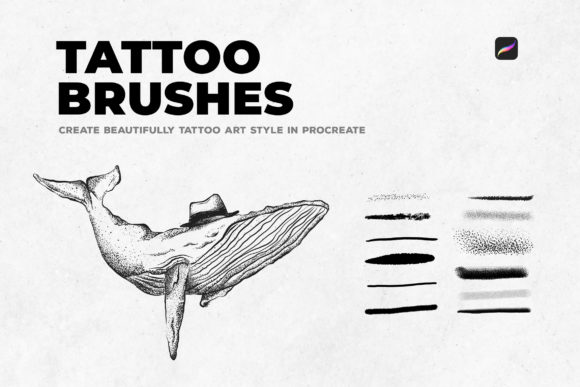
When artists use inappropriate tools, their line work can appear jagged or overly uniform, lacking the dynamic flow necessary for body art. This affects the perceived quality of the design. Clients looking for custom tattoos want to see precision and artistic intent. If your digital sketches look like basic vector outlines, you may struggle to convey the depth and texture of the final tattoo. The 12 Tattoo Art Brushes - Procreate set addresses this by offering tools specifically calibrated for stippled textures and real ink outlines, ensuring your digital drafts mirror the final result on skin.
Overlooking the Power of Stippling and Texture
Stippling is a foundational technique in tattooing, used for shading, gradient creation, and adding depth without heavy blackwork. A common oversight is attempting to recreate stippling manually using standard dot brushes or scatter tools. This approach is incredibly time-consuming and often results in unnatural patterns that lack organic randomness.
Many creators underestimate the importance of texture in digital art. Without the right brush dynamics, shaded areas can look muddy or pixelated. The brushes in this collection are crafted to create authentic stippled textures automatically. This means you can achieve complex shading effects with fewer strokes, maintaining control over density and spread. Ignoring this capability forces artists to work harder for inferior results. By leveraging brushes designed for texture, you streamline your workflow and produce cleaner, more professional-looking gradients that translate well to actual tattoo application.
Neglecting Brush Settings and Customization
Another critical error is failing to adjust brush settings to match individual drawing styles. Even high-quality preset brushes require minor tweaks to feel natural in your hand. Some users download the 12 Tattoo Art Brushes - Procreate and begin using them immediately without testing pressure curves or stabilization settings. This can lead to inconsistent line weights and shaky outlines.
For instance, if you prefer a heavier hand, you might need to reduce the pressure sensitivity for lining brushes to prevent lines from becoming too thick unintentionally. Conversely, light-handed artists may need to increase sensitivity to achieve proper tapering. Taking ten minutes to calibrate these settings can drastically improve usability and efficiency. It ensures that the tool responds predictably, allowing you to focus on creativity rather than fighting the software. Always test new brushes on a blank canvas, experimenting with different pressures and angles before committing to a client design.
The Trap of Over-Complicating the Workflow
In an effort to showcase technical skill, some artists overload their designs with excessive effects, filters, or unnecessary layers. This is particularly tempting when using new digital tools. However, tattoo design requires clarity and simplicity. The end goal is a stencil that a tattoo artist can easily transfer to skin. Overly complex digital renderings can obscure the core design elements, making it difficult for the practitioner to interpret the artwork.
The beauty of this specific brush set lies in its simplicity. With only twelve curated tools, it encourages a focused approach. You have dedicated brushes for outlining and others for texturing, eliminating the need to sift through hundreds of redundant options. This streamlined selection helps maintain a clean workflow. Stick to the essentials: use the lining brushes for crisp contours and the stipple brushes for shading. Avoid adding excessive digital noise or effects that cannot be replicated with ink. Keeping your digital process aligned with traditional constraints ensures your designs remain practical and executable.
Evaluating Quality Before Purchase
Before investing in any digital asset, it is crucial to verify its compatibility and utility. Not all brush sets are created equal. Some may claim to offer tattoo-specific tools but lack the necessary resolution or pressure dynamics. When considering the 12 Tattoo Art Brushes - Procreate, check for reviews or demonstrations that highlight line consistency and texture realism.
Look for examples where the brushes are used in actual design scenarios. Do the outlines remain smooth at various sizes? Does the stippling maintain its integrity when scaled up or down? These are key indicators of quality. Additionally, ensure the brushes are compatible with your version of Procreate. While most modern brushes are backward compatible, checking specifications prevents technical issues post-purchase. Remember, the right tools should enhance your natural style, not force you to adapt to their limitations.
Practical Steps for Integration
To get the most out of these tools, integrate them gradually into your existing workflow. Start by replacing your current lining brush with one from the set. Practice drawing long, flowing lines to get a feel for the taper and stability. Once comfortable, introduce the stippling brushes for shading exercises. Try recreating old traditional flash sheets to understand how the digital tools mimic historical techniques.
- Test Pressure Sensitivity: Adjust your Apple Pencil settings to match the brush response.
- Layer Management: Keep line work and shading on separate layers for easier editing.
- Export Correctly: Ensure your final designs are exported in high-resolution formats suitable for printing stencils.
By approaching digital tattoo art with a mindset of precision and practicality, you can avoid the common traps that hinder many creators. The 12 Tattoo Art Brushes - Procreate offer a reliable foundation for achieving authentic results. They bridge the gap between digital convenience and traditional craftsmanship, allowing you to produce work that respects the integrity of tattoo culture while leveraging modern technology. Focus on mastering these few powerful tools rather than collecting hundreds of mediocre ones, and you will see a marked improvement in both your efficiency and the quality of your artistic output.