Mastering Outline Shadow Lettering: A Guide to Procreate’s 25-Brush Contour Pack
In the rapidly evolving world of digital illustration, typography has transcended its traditional role as mere text. Today, lettering is a central visual element in social media graphics, brand identities, and digital art. Among the most popular styles is outline shadow lettering, a technique that adds depth, dimension, and a pop-art aesthetic to handwritten words. However, achieving this look manually can be time-consuming and technically demanding. This is where specialized toolsets, such as the Outline Shadow Lettering Brushes pack, become indispensable for creators.
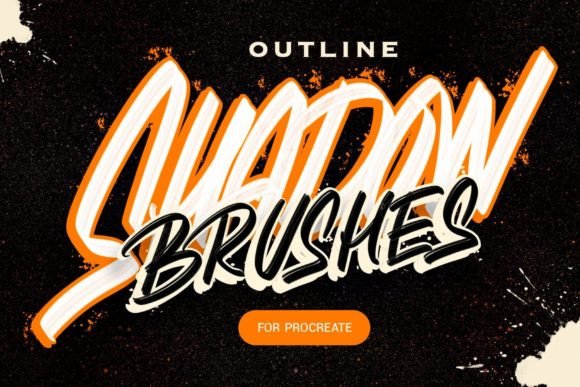
This comprehensive guide explores the functionality, significance, and practical application of this specific brush set. Designed for Procreate 5 and above on iPad with Apple Pencil, this pack contains 25 unique contours, shadow, and splatter brushes. By understanding how these tools work, artists of all skill levels can streamline their workflow and elevate their typographic designs.
Understanding the Mechanics of Digital Lettering
To appreciate the value of this brush pack, one must first understand the challenge it solves. Traditional outline lettering involves drawing a shape, then carefully tracing around it to create a border. Adding a shadow requires calculating light sources and drawing additional shapes offset from the original. In a manual workflow, this process is prone to errors. Lines may overlap unevenly, corners may look messy, and consistency across different letters is difficult to maintain.
The Outline Shadow Lettering Brushes address these pain points through intelligent engineering. The core innovation lies in the brush settings, which allow users to change the fill and outline colors independently. This separation is crucial for creating high-contrast, readable designs. Furthermore, the brushes are programmed to write with a gap. This means that as you draw, the lines do not overlap in a chaotic manner; instead, they create a single, clean outline. This feature ensures that even rapid, expressive handwriting retains a professional, polished appearance.
The Role of Contours and Splatters
The pack includes not just standard lettering tools but also 25 varied assets including contours and splatters. Why are these important? Modern digital design often relies on texture and organic imperfections to feel authentic. A perfectly smooth vector line can sometimes feel sterile or cold. Splatter brushes add dynamic energy, mimicking ink drops or paint sprays, which can frame your lettering or add emphasis to specific words. Contours provide structural variety, allowing artists to experiment with double outlines, dashed borders, or decorative frames without needing to draw them by hand.
Key Features and Customization Options
One of the standout aspects of this toolset is its flexibility. While the brushes come with default settings optimized for immediate use, they are fully customizable. This aligns with the modern creator’s need for versatility. Whether you are designing a bold poster for a music event or a subtle caption for an Instagram story, the ability to tweak parameters is essential.
- Independent Color Control: Users can adjust the fill color separately from the outline. This allows for creative combinations, such as a pastel fill with a dark, sharp outline, or a transparent fill with a neon border.
- Non-Overlapping Lines: The "write with a gap" setting ensures that when you retrace a letter or connect strokes, the outline remains uniform. This prevents the "blobbing" effect common in standard round brushes.
- Brightness Adjustment: The included
.zipfile contains a specific setting tweak designed to make the brush fill appear brighter. This is particularly useful for designs intended for backlit screens or high-key lighting environments where vibrancy is key. - Variety of Textures: With 25 different brushes, users have access to a wide range of stylistic options, from clean geometric shadows to gritty, organic splatters.
Practical Applications in Modern Creativity
The utility of these brushes extends far beyond hobbyist doodling. In professional contexts, efficiency and consistency are paramount. Here is how these tools fit into various sectors of the creative industry:
Social Media and Content Creation
For influencers and digital marketers, speed is critical. Creating engaging stories or posts often requires quick turnaround times. Using these brushes, a creator can type out a quote or headline, apply a stylish outline and shadow instantly, and add splatter effects for visual interest. The result is a high-quality graphic that looks custom-designed but was produced in a fraction of the time it would take using standard tools.
Brand Identity and Logo Design
While final logos are often vectorized, the conceptual phase benefits greatly from rapid prototyping. Designers can use these brushes to sketch out typographic concepts, experimenting with different weights and shadow directions. The ability to change fill and outline colors on the fly allows for quick A/B testing of color palettes, helping clients visualize the final brand identity more effectively.
Educational Materials and Presentations
Educators and presenters can use these tools to create visually engaging slides or worksheets. Handwritten-style text often feels more approachable and personal than standard fonts. By using outline lettering, key terms can be highlighted effectively, drawing the viewer’s attention to important concepts without cluttering the slide with excessive graphics.
Getting Started: A Step-by-Step Approach
For beginners, integrating new brushes into their workflow can seem daunting. However, the process is straightforward. First, ensure your iPad is running Procreate 5 or later, as older versions may not support the advanced brush engine features utilized in this pack. Once installed, select a brush from the contour category. Choose your desired fill and outline colors from the palette. Begin writing slowly to observe how the gap function maintains the integrity of the outline. If the fill appears too dull, apply the brightness setting included in the download.
- Install the Brush Set: Import the
.brushsetfile into Procreate. - Select Your Tool: Choose a contour brush for the main text and a splatter brush for accents.
- Configure Colors: Set your primary color for the fill and a contrasting color for the outline.
- Adjust Brightness: If needed, apply the preset adjustment to enhance the fill’s vibrancy.
- Experiment with Pressure: Use the Apple Pencil’s pressure sensitivity to vary line weight, adding dynamic flair to your lettering.
Common Misconceptions About Digital Lettering Tools
A frequent misunderstanding is that using pre-made brushes limits creativity. On the contrary, these tools remove technical barriers, allowing artists to focus on composition and style. Another assumption is that digital lettering lacks the warmth of hand-drawn ink. However, with the inclusion of splatter and textured contour brushes, this pack specifically aims to replicate the organic feel of traditional media while leveraging the precision of digital technology.
Furthermore, some users believe that complex settings require advanced technical knowledge. In reality, the default configurations are designed for immediate usability. The advanced options are there for those who wish to dive deeper, but they are not required to produce stunning results.
Conclusion
The Outline Shadow Lettering Brushes pack represents a significant advancement in digital typographic tools. By combining 25 versatile contours, shadow, and splatter brushes with intelligent settings like non-overlapping lines and independent color control, it empowers creators to produce professional-grade lettering with ease. Whether you are a seasoned graphic designer or a beginner exploring the possibilities of Procreate on iPad, this toolset offers the flexibility and efficiency needed to thrive in today’s fast-paced creative landscape. Embrace these tools to transform your text into compelling visual art, bridging the gap between technical precision and artistic expression.