Mastering Digital Florals: A Practical Guide to Procreate Botanical Watercolour Brushes
The transition from traditional media to digital illustration often presents a significant hurdle for artists who cherish the organic unpredictability of watercolour. While digital tools offer unparalleled convenience and editability, they can sometimes feel sterile or overly controlled. This is where specialized toolsets, such as Procreate Botanical Watercolour Brushes, bridge the gap. These resources are designed not merely to mimic paint, but to replicate the specific fluid dynamics, texture, and transparency associated with hand-painted botanical studies. For creators ranging from hobbyists to professional designers, understanding the nuances of these digital assets is essential for determining whether they fit into your current workflow.
Understanding the Distinct Characteristics of Digital Watercolour
At their core, Procreate Botanical Watercolour Brushes are engineered to simulate the behavior of pigment on paper. Unlike standard round or flat brushes that apply uniform opacity, these custom tools incorporate complex algorithms for water dispersion, edge bleeding, and granulation. The result is a stroke that behaves like real watercolour: it pools at the edges, dries with subtle texture variations, and allows underlying layers to show through with realistic translucency.
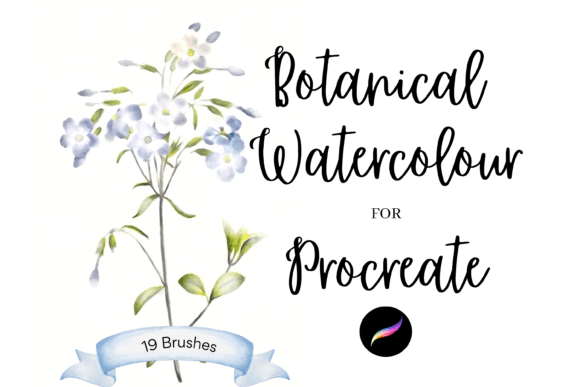
This pack typically contains a curated selection of unique individual brushes—often around 19 distinct options in comprehensive sets—each serving a specific purpose in the botanical illustration process. Some brushes are optimized for broad washes, creating soft backgrounds or large leaf structures, while others are fine-tuned for intricate details like stamen, veins, or delicate petal edges. The value lies in this specialization. A general-purpose brush might require extensive manual tweaking to achieve a natural look, whereas a dedicated botanical brush provides that aesthetic immediately, allowing the artist to focus on composition and form rather than fighting the software.
Evaluating Fit: When These Brushes Excel
Determining whether Procreate Botanical Watercolour Brushes are the right choice for your project requires an assessment of your end goals. These tools are particularly effective for creators who need versatility across both digital and physical mediums. Because the output is high-resolution digital art, the same file can be used for screen-based projects and printed goods without loss of quality.
Consider the following use cases where these brushes provide significant advantages:
- Greeting Cards and Invitations: The soft, romantic aesthetic of watercolour is a perennial favorite for wedding stationery and birthday cards. These brushes allow for rapid iteration of floral motifs that feel handcrafted rather than mass-produced.
- Print on Demand Products: For entrepreneurs selling wrapping paper, textiles, or wall art, the ability to resize and recolor elements is crucial. A single botanical illustration can be adapted for a mug, a tote bag, or a large canvas print, maximizing the utility of each design.
- Scrapbooking and Digital Planning: The trend toward digital journaling has created a demand for authentic-looking clip art. These brushes enable users to create custom stickers and embellishments that integrate seamlessly with other digital paper textures.
- DIY Craft Projects: Even if the final product is physical, starting digitally allows for precise layout planning. You can experiment with color palettes and arrangements before committing to expensive watercolour paper and paints.
The key strength here is efficiency combined with authenticity. For a professional illustrator, time is money. Being able to generate a realistic watercolour effect in minutes, rather than hours of painting and scanning, offers a compelling return on investment.
Comparative Analysis: Digital Brushes vs. Traditional Media
When evaluating Procreate Botanical Watercolour Brushes, it is helpful to compare them against traditional watercolour painting and generic digital brushes. Each approach has distinct tradeoffs regarding control, cost, and learning curve.
Traditional Watercolour: The primary advantage of traditional media is the genuine physical interaction between water, pigment, and paper. No digital tool can perfectly replicate the happy accidents caused by humidity, paper texture, or pigment granularity. However, traditional painting is unforgiving. Mistakes are difficult to correct, and the process requires significant setup and cleanup time. Additionally, creating multiple variations of a design requires repainting each version from scratch.
Generic Digital Brushes: Standard brushes in Procreate or other software are versatile but often lack the specific "feel" of watercolour. Artists may spend considerable time adjusting opacity, flow, and blending modes to approximate a wet-on-wet effect. This can disrupt the creative flow. In contrast, Procreate Botanical Watercolour Brushes come pre-configured with these settings, offering a more intuitive experience for those specifically seeking a painterly look.
Specialized Botanical Brushes: These tools offer a middle ground. They provide the corrective flexibility of digital art—such as the ability to undo, resize, and recolor—while maintaining the aesthetic warmth of traditional media. The limitation, however, is the learning curve associated with digital layering. To achieve realistic results, users must understand how to stack transparent layers to build depth, mimicking the glazing techniques of traditional watercolour.
Technical Considerations and Limitations
While Procreate Botanical Watercolour Brushes are powerful, they are not a magic solution. Users should be aware of certain technical constraints. First, the quality of the output depends heavily on the user’s skill level. A brush can simulate texture, but it cannot compose a balanced illustration or choose a harmonious color palette. Beginners may find that their initial results look somewhat flat if they do not utilize layering effectively.
Second, hardware matters. To fully appreciate the pressure sensitivity and tilt features embedded in these brushes, a stylus with high precision is recommended. Using a finger or a basic capacitive stylus will limit the dynamic range of the strokes, reducing the organic feel.
Finally, consider the file format and compatibility. These brushes are designed specifically for Procreate on iPad. If your workflow involves desktop-based software like Photoshop or Clip Studio Paint, you will need to ensure that alternative versions are available or be prepared to adapt your process. The instant download nature of these products means there is no physical shipping, which is convenient, but it also means there is no trial period. Reviewing demo videos or sample galleries before purchasing is advisable to ensure the style aligns with your vision.
Decision Factors: Is This the Right Tool for You?
Choosing to invest in Procreate Botanical Watercolour Brushes should depend on your specific creative needs. Ask yourself the following questions:
- Do you value speed and editability? If you need to produce multiple variations of a design for clients or print-on-demand stores, the digital workflow offers unmatched efficiency.
- Is the watercolour aesthetic central to your brand? If your style is more graphic, vector-based, or oil-painting inspired, these brushes may not see much use. They are niche tools for a specific look.
- Are you comfortable with digital layering? Achieving the best results requires an understanding of how digital layers interact. If you are new to Procreate, there may be a brief learning period before you can fully leverage the potential of these brushes.
- Do you plan to use the art for commercial products? The ability to resize and recolor without quality loss makes these brushes ideal for merchandise, from wrapping paper to wall art. If your work remains strictly personal or sketch-based, the benefits may be less pronounced.
For many creators, the decision comes down to the balance between authenticity and convenience. If you miss the look of watercolour but dislike the mess and irreversibility of traditional painting, these digital brushes offer a compelling compromise. They allow for the creation of "bee utiful" DIY projects that feel personal and handcrafted, whether they remain on a screen or are printed onto physical goods.
Integrating Brushes into a Broader Creative Workflow
To get the most out of Procreate Botanical Watercolour Brushes, consider integrating them into a hybrid workflow. Start with rough sketches using standard pencils, then switch to the botanical brushes for coloring. Use the resizing and recoloring features to experiment with different compositions rapidly. Once satisfied, export your work at high resolution for printing or further editing in desktop software.
Additionally, explore the potential for combining these brushes with other digital assets. Many artists pair watercolour brushes with textured paper backgrounds to enhance the realism. The clip art elements created can be saved as individual PNG files with transparent backgrounds, building a personal library of assets for future projects. This approach maximizes the value of the initial purchase, turning a single brush pack into a long-term resource for greetings cards, scrapbooking, and beyond.
In conclusion, Procreate Botanical Watercolour Brushes represent a specialized tool for a specific aesthetic. They are not a replacement for traditional media, nor are they a universal solution for all digital art. However, for those seeking to create elegant, organic botanical illustrations with the flexibility of digital technology, they offer a robust and efficient pathway. By understanding their strengths, limitations, and best-use scenarios, you can make an informed decision about whether they belong in your digital toolkit.