Mastering Digital Sketching: A Practical Review of Basic Brushes for Procreate
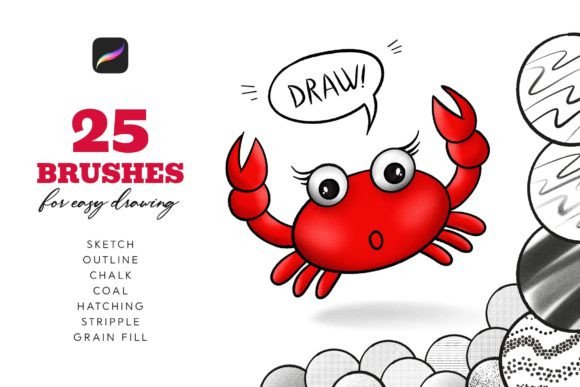
For digital artists transitioning from traditional media or those seeking to streamline their workflow on the iPad, the choice of brush engine is foundational. While Procreate comes with a robust native library, many users find themselves searching for specialized tools that mimic specific tactile sensations without the complexity of hyper-realistic simulation. Basic Brushes for Procreate emerges as a targeted solution in this space, offering a curated set of twenty-five tools designed specifically for the structural phases of illustration: sketching, outlining, and textural shading.
This article evaluates the utility, design philosophy, and practical application of this brush set. By examining its components—ranging from line work to hatching and stipple textures—we can determine whether this collection serves as an essential addition to your digital toolkit or if alternative resources might better suit your artistic style.
Understanding the Core Philosophy: Simplicity Over Simulation
The digital art market is saturated with brush packs that promise photorealism, complex blending modes, and intricate particle effects. In contrast, Basic Brushes for Procreate adopts a minimalist approach. The primary distinction here is intent. These brushes are not designed to replace a full painting suite but to facilitate the initial stages of creation: the sketch, the outline, and the foundational shadowing.
For artists who feel overwhelmed by thousands of preset options, this restraint is a significant advantage. The set includes nine line brushes, seven hatching brushes, five stipple brushes, one coal brush, and three fill brushes. This distribution suggests a workflow focused on clarity and structure rather than atmospheric rendering. If your process involves heavy reliance on clean linework and manual texture application, this categorization aligns directly with your needs.
The Importance of Pressure and Tilt Sensitivity
A critical factor in evaluating any digital brush is its responsiveness to hardware input. The Basic Brushes for Procreate are engineered to be fully sensitive to both pen pressure and tilt. This dual sensitivity is vital for achieving natural variation in line weight and texture density.
For example, the line brushes allow for dynamic thickening and thinning based on how hard you press, mimicking the behavior of a traditional ink nib or graphite pencil. Meanwhile, the tilt sensitivity is particularly relevant for the hatching and coal brushes. By tilting the Apple Pencil, users can broaden the stroke, creating wider areas of shade or softer edges, much like using the side of a charcoal stick on paper. This feature reduces the need for constant tool switching, allowing for a more fluid and uninterrupted creative process.
Component Breakdown: Analyzing the Brush Categories
To understand the value proposition, it is necessary to look at how each subset of brushes functions within a typical workflow.
- Line Brushes (9 Variants): These are the workhorses of the set. They range from sharp, technical pens suitable for architectural sketches to softer, organic lines ideal for character design. The variety allows artists to choose a line quality that matches the mood of the piece without needing to adjust streamlining or stabilization settings manually.
- Hatching Brushes (7 Variants): Hatching is a traditional technique for creating value and form through parallel lines. Digital hatching can often look repetitive or artificial. These brushes introduce subtle irregularities and noise, making cross-hatching appear hand-drawn rather than computer-generated. They are particularly effective for comic book styles or editorial illustrations.
- Stipple Brushes (5 Variants): Stippling, or pointillism, is time-consuming when done manually with a standard round brush. These specialized tools automate the dispersion of dots, allowing artists to build up tone and texture rapidly. They are excellent for adding grain to shadows or creating soft, atmospheric transitions.
- Coal and Fill Brushes: The single coal brush provides a gritty, textured mark perfect for rough underpaintings or bold, expressive strokes. The three fill brushes are designed for quickly blocking in solid colors or flat areas, serving as a practical utility for separating layers before detailed rendering begins.
Comparative Evaluation: When to Choose This Set
Deciding whether to integrate Basic Brushes for Procreate into your library requires comparing it against other available options. Here, we explore the tradeoffs and best-fit scenarios.
Best-Fit Scenarios
This brush set is ideally suited for illustrators, concept artists, and hobbyists who prioritize speed and clarity in their sketching phase. If you frequently find yourself spending excessive time tweaking default brushes to get a "clean" line or a "natural" hatch, this pre-configured set offers an immediate efficiency boost. It is also an excellent choice for beginners who want to understand the mechanics of digital texturing without being distracted by overly complex brush engines.
Furthermore, artists working in black-and-white comics, manga, or technical illustration will find the hatching and line brushes particularly valuable. The ability to add noise and grain through dedicated stipple brushes allows for rich tonal variation without relying on heavy post-processing filters.
Limitations and Alternatives
However, this set is not a universal solution. Artists focused on full-color painting, realistic portraiture, or landscape art may find the toolkit insufficient. The absence of advanced blending brushes, watercolor simulations, or oil paint impasto effects means that users will still need to rely on Procreate’s default library or other specialized packs for the rendering phase.
If your primary goal is to create painterly, blended artworks, you might consider alternatives that focus on wet-media simulation. Conversely, if you are looking for a comprehensive all-in-one solution that covers everything from sketching to final polish, you may need to combine this set with other resources. Basic Brushes for Procreate is a specialist tool, not a generalist suite.
Technical Compatibility and Installation
Before purchasing or downloading, it is crucial to note the technical constraints. These brushes are compatible ONLY with the Procreate application on Apple iPad. They will not function in Adobe Photoshop, Clip Studio Paint, or any desktop-based graphic editing software. This limitation is due to the proprietary nature of Procreate’s brush engine file format (.brushset).
The installation process is designed to be straightforward, reflecting the "basic" ethos of the product. Users simply download the file directly to their iPad, tap on the Basic_by_Sko4.brushset file, and Procreate automatically installs the brushes. They will appear at the top of the brush list, ready for immediate use. This ease of integration lowers the barrier to entry, allowing artists to test the tools within minutes of download.
Customization and Workflow Integration
One of the understated strengths of this set is its customizability. While the presets are optimized for immediate use, Procreate allows users to modify any brush parameter. If a specific hatching brush feels too dense, you can adjust the spacing and jitter. If a line brush lacks the desired taper, you can tweak the pressure curve. This flexibility ensures that the brushes can evolve with your skills.
For professionals, this means the set can serve as a starting point for creating personalized variants. For casual users, the default settings are generally well-balanced, requiring minimal adjustment. The key is to experiment with the pressure sensitivity settings on your iPad to ensure the brushes respond accurately to your personal drawing style.
Making an Informed Decision
Ultimately, the value of Basic Brushes for Procreate lies in its focus. It does not attempt to do everything; instead, it aims to excel at the fundamental tasks of digital drawing. By providing high-quality, responsive tools for sketching, outlining, and texturing, it addresses a common pain point for digital artists: the friction between idea generation and execution.
If you are an artist who values clean lines, manual texturing techniques, and a streamlined workflow, this set offers a compelling resource. It bridges the gap between traditional sketching habits and digital convenience. However, if your work relies heavily on complex blending, photorealistic rendering, or multi-software workflows, you should view this as a supplementary tool rather than a complete replacement for your existing library.
Evaluating your current workflow bottlenecks is the best way to determine fit. Do you struggle with inconsistent line weight? Do you find manual hatching tedious? If the answer is yes, these twenty-five brushes may provide the precise utility needed to enhance your productivity and artistic expression on the iPad.